Thema-ondersteuning
IntroVox past zich automatisch aan aan alle Nextcloud-thema's. Geen configuratie nodig.
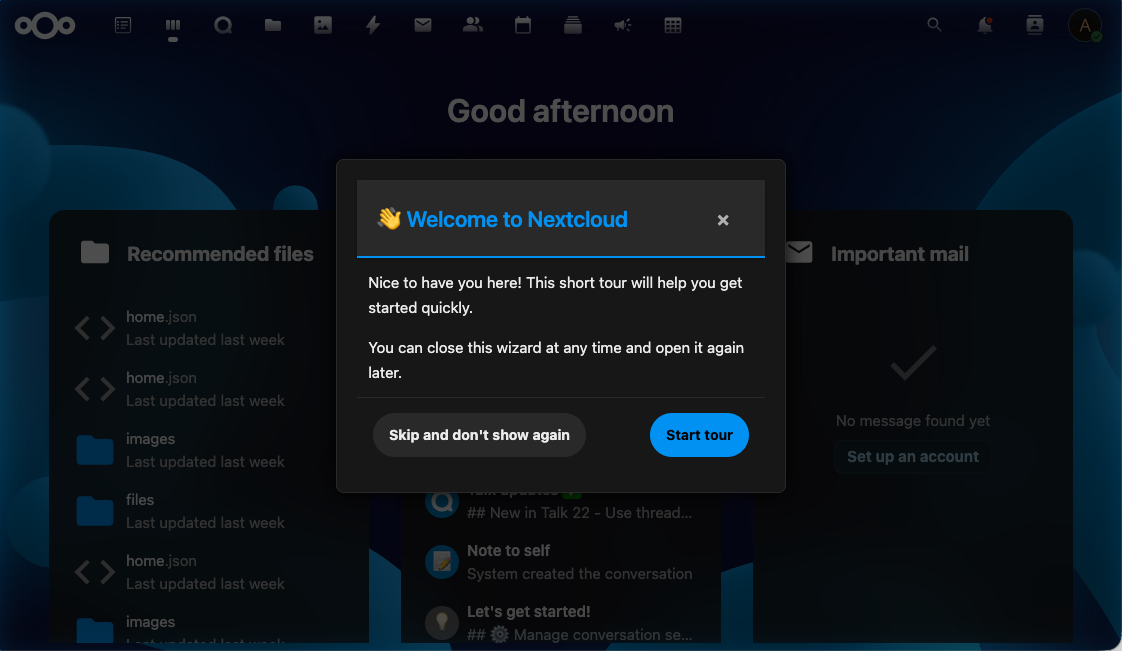
Ondersteunde thema's
- ✅ Light-modus (default)
- ✅ Dark-modus (via systeem-voorkeur of Nextcloud-instelling)
- ✅ Hoog-contrast-modus (toegankelijkheid)
- ✅ Custom thema's (via de Nextcloud-Theming-app)
Hoe het werkt
De wizard gebruikt Nextcloud's CSS-variabelen in plaats van hardcoded kleuren:
| Variabele | Doel |
|---|---|
--color-main-background |
Stap-achtergrond |
--color-main-text |
Body-tekst |
--color-primary-element |
Accent (knoppen, highlight-randen) |
--color-border |
Stap-container-rand |
--color-background-hover |
Hover-staten op knoppen |
Omdat deze variabelen scoped zijn aan het document en geüpdatet worden door het Nextcloud-theming-systeem, pakt de wizard automatisch elke thema-wijziging op — inclusief custom thema's gedeployed via de Theming-app.
Toegankelijkheid
Beperkte beweging
Als de "reduce motion"-toegankelijkheidsvoorkeur van het systeem van de gebruiker is ingeschakeld, schakelt IntroVox zijn animaties uit (stap-overgangen, fade-ins, overlay-tweens).
Hoog contrast
In hoog-contrast-modus gebruikt de wizard verbeterde rand-diktes en kleur-contrasten om leesbaar te blijven.
Toetsenbord-focus
Alle interactieve elementen hebben zichtbare focus-indicators die zich aanpassen aan het huidige thema — ze blijven duidelijk zichtbaar in zowel light- als dark-modus.
Semantische HTML en ARIA
Stappen gebruiken semantische HTML (<h2> voor titels, <button> voor acties) en ARIA-labels waar nodig, zodat screenreaders content correct kunnen aankondigen.
Custom CSS
IntroVox ondersteunt momenteel geen custom-CSS-overrides via het admin-paneel. Als je custom styling nodig hebt, kun je:
- De Nextcloud-Theming-app gebruiken om globale CSS-variabelen aan te passen (wijzigingen gelden automatisch voor IntroVox)
- Custom CSS deployen op Nextcloud-niveau (via de "Custom CSS"-feature van de Theming-app)
Vermijd inline-styles binnen stap-HTML — die breken thema-overerving.
Zie ook
- Customization — HTML, CSS-selectors, positionering
- Toetsenbord-navigatie — toegankelijkheids-features voor gebruikers
- Architectuur-overzicht — hoe de frontend integreert met Nextcloud-theming