IntraVox Export & Import Documentation
Overview
IntraVox provides comprehensive export and import functionality for managing content across installations. This document describes the current implementation and serves as a foundation for future enhancements.
Table of Contents
- Admin Interface
- Export Functionality
- Import Functionality
- MetaVox Integration
- Confluence Import
- Data Structure
- API Endpoints
- Code Architecture
- Future Enhancements
Admin Interface
Location: Nextcloud Admin Settings → IntraVox → Export/Import section
The export/import interface uses a tabbed navigation with three tabs:
Tab 1: Export
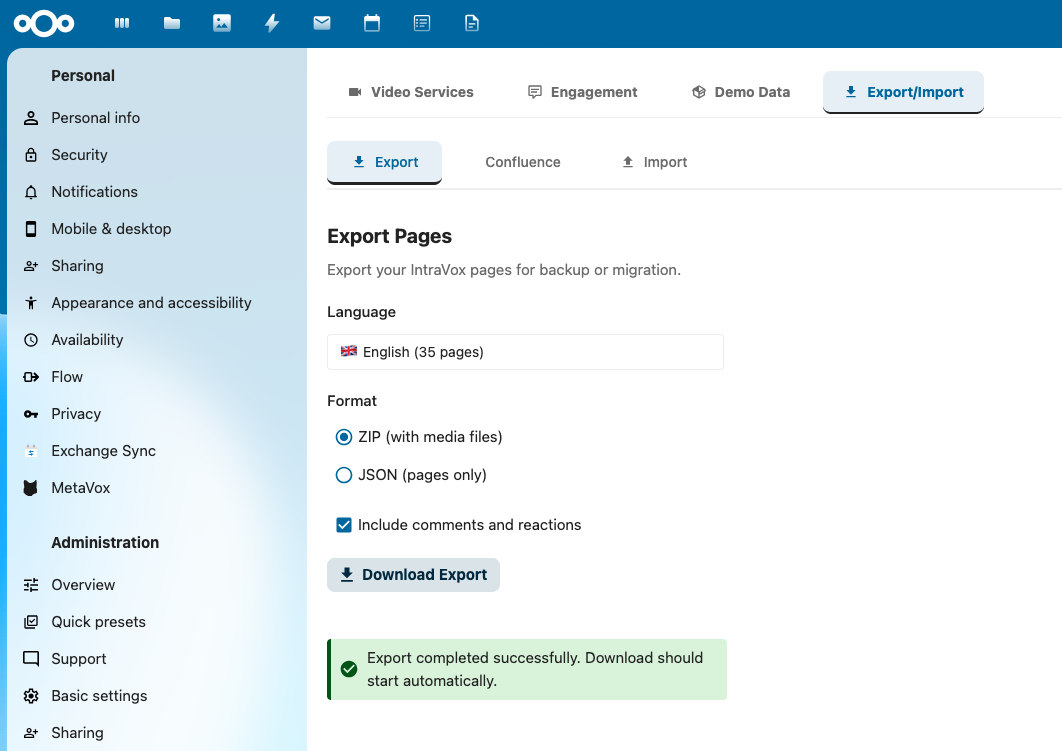
- Export pages by language
- Option to include comments
- Shows page count per language
- Download as ZIP file
Tab 2: Confluence
- Import from Confluence HTML export
- Upload HTML export ZIP file
- Select parent page for imported content
- Preserves page hierarchy
Tab 3: Import
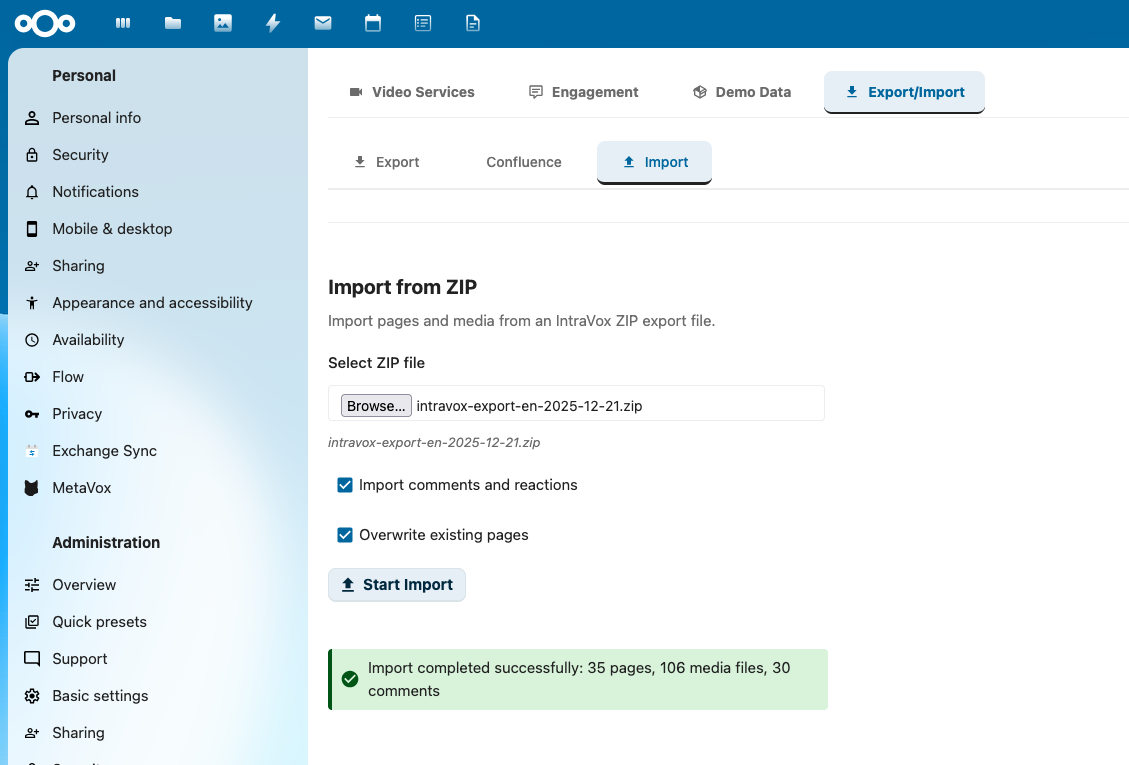
- Import IntraVox ZIP files
- Upload previously exported ZIP
- Options:
- Include comments (if available in ZIP)
- Overwrite existing pages
- Auto-create MetaVox fields (v0.9.0+)
- Shows import progress and results
- Displays MetaVox compatibility warnings if applicable
File Location: src/views/AdminSettings.vue
Export Functionality
How It Works
- User Interaction:
- Admin selects language from dropdown (nl, en, de, fr)
- Optionally checks "Include comments" checkbox
-
Clicks "Export Language" button
-
Frontend Request:
-
Backend Processing (
lib/Service/ExportService.php):exportLanguageAsZip(language, includeComments) ├─ Create temporary directory ├─ Get all pages for language via PageService ├─ Export each page as JSON: │ ├─ Page metadata (id, title, uniqueId, path, layout, settings) │ ├─ Widget content │ └─ Comments (if includeComments = true) ├─ Copy _media folders ├─ Copy _resources folder (if exists) ├─ Create manifest.json with metadata ├─ Create ZIP archive └─ Return ZIP file -
ZIP Structure:
Export Format Versions
v1.0 (Before v0.9.0): - Basic page export with comments - No MetaVox metadata
v1.1 (v0.9.0+): - Includes MetaVox metadata when MetaVox is installed - Backward compatible with v1.0 imports
Manifest Structure (v1.0)
{
  "version": "1.0",
  "language": "nl",
  "exportDate": "2025-12-16T10:30:00Z",
  "pageCount": 135,
  "includesComments": true,
  "includesMedia": true,
  "includesResources": true
}
Export Structure (v1.1 with MetaVox)
{
  "exportVersion": "1.1",
  "exportDate": "2025-12-16T14:30:00+00:00",
  "language": "nl",
  "metavox": {
    "version": "1.3.0",
    "fieldDefinitions": [
      {
        "field_name": "document_type",
        "field_label": "Document Type",
        "field_type": "select",
        "field_description": "Type of document",
        "field_options": ["Policy", "Procedure", "Guide"],
        "is_required": true,
        "sort_order": 0,
        "scope": "groupfolder"
      }
    ]
  },
  "navigation": {...},
  "footer": {...},
  "pages": [...]
}
Page JSON Structure (v1.1 with MetaVox)
{
  "id": "page-slug",
  "uniqueId": "page-uuid-v4",
  "title": "Page Title",
  "path": "nl/parent/page-slug",
  "parentPath": "nl/parent",
  "layout": {
    "columns": 2,
    "rows": [
      {
        "widgets": [
          {
            "id": "widget-1",
            "type": "heading",
            "content": "Title",
            "level": 1,
            "column": 1,
            "order": 1
          }
        ]
      }
    ]
  },
  "settings": {
    "allowReactions": true,
    "allowComments": true,
    "allowCommentReactions": true
  },
  "metadata": [
    {
      "field_name": "document_type",
      "value": "Policy"
    },
    {
      "field_name": "department",
      "value": "Human Resources"
    }
  ],
  "comments": [
    {
      "id": 123,
      "message": "Comment text",
      "actorId": "user1",
      "actorDisplayName": "User One",
      "creationDateTime": "2025-12-16T10:00:00Z",
      "parentId": null,
      "reactions": []
    }
  ]
}
Export API Endpoints
Get Exportable Languages:
GET /apps/intravox/api/export/languages
Response: {
  "languages": ["nl", "en", "de", "fr"],
  "pageCounts": {
    "nl": 135,
    "en": 142,
    "de": 0,
    "fr": 0
  }
}
Export Language (JSON):
GET /apps/intravox/api/export/language/{language}
Response: {
  "pages": [...],
  "media": {...},
  "comments": {...}
}
Export Language (ZIP):
GET /apps/intravox/api/export/language/{language}/zip?includeComments=true
Response: application/zip (download)
Export Single Page:
GET /apps/intravox/api/export/page/{uniqueId}
Response: {
  "page": {...},
  "media": [...],
  "comments": [...]
}
Import Functionality
How It Works
- User Interaction:
- Admin uploads IntraVox ZIP file
- Checks options:
- "Include comments" (if ZIP contains comments)
- "Overwrite existing pages" (replace duplicates)
-
Clicks "Import" button
-
Frontend Request:
// AdminSettings.vue - importZip() const formData = new FormData() formData.append('file', this.importFile) formData.append('includeComments', this.importIncludeComments) formData.append('overwrite', this.importOverwrite) const response = await axios.post( generateUrl('/apps/intravox/api/import/zip'), formData, { headers: { 'Content-Type': 'multipart/form-data' }, onUploadProgress: (progressEvent) => { this.importProgress = Math.round( (progressEvent.loaded * 100) / progressEvent.total ) } } ) -
Backend Processing (
lib/Controller/ApiController.php):import_zip(file, includeComments, overwrite) ├─ Validate file (ZIP, max 50MB) ├─ Extract to temporary directory ├─ Read manifest.json ├─ Validate structure ├─ Import pages: │ ├─ Read page JSON files │ ├─ Check for duplicates (by uniqueId) │ ├─ If exists && overwrite: update │ ├─ If exists && !overwrite: skip │ ├─ If new: create │ └─ Import comments (if includeComments) ├─ Import media files: │ ├─ Copy to _media folders │ └─ Copy to _resources folder └─ Return import results -
Import Results:
Import Options
Include Comments (includeComments):
- If true: Import comments from ZIP if available
- If false: Skip comments, only import page structure
- Comments are matched to existing users by actorId
- If user doesn't exist, comment is imported with original actorDisplayName
Overwrite Existing Pages (overwrite):
- If true: Update existing pages with same uniqueId
- If false: Skip existing pages, only import new ones
- Overwrites entire page structure, widgets, and settings
- Media files are always copied (no overwrite of existing media)
If an import fails halfway
There is no rollback, no resume and no idempotency key. An import that fails
partway leaves whatever it already wrote, and re-running it is governed entirely
by overwrite:
overwrite: false— pages already written are skipped and counted underpagesSkipped. Safe to re-run; it finishes what is missing.overwrite: true— everything is written again, including pages that succeeded the first time. Also safe, but it discards any edits made in between.
Read the stats object rather than the HTTP status to see what actually
happened: a run that skipped everything and a run that imported everything both
return 200.
For planning a large migration, note that the counters are totals — there is no per-page list, so a skipped page is counted but not named. To know which pages already existed, compare the export against the target before importing.
Import Validation
Before importing, the system validates:
- File Format:
- Must be valid ZIP file
-
Size limit: 50MB (configurable via PHP settings)
-
ZIP Structure:
- Must contain
manifest.json - Must have
pages/directory -
Page files must be valid JSON
-
Data Validation:
- Each page must have
uniqueId - Page paths must be valid (no directory traversal)
-
Widget types must be supported
-
Permission Checks:
- User must have admin permissions
- Target language folder must exist
- User must have write access to target folders
Import API Endpoint
Import ZIP File (Updated in v0.9.0):
POST /apps/intravox/api/import/zip
Content-Type: multipart/form-data

Parameters:
- file: ZIP file
- includeComments: boolean (default: false)
- overwrite: boolean (default: false)
- autoCreateMetaVoxFields: boolean (default: false) [NEW in v0.9.0]

Response: {
  "success": true,
  "stats": {
    "pagesImported": 135,
    "pagesSkipped": 5,
    "mediaFilesImported": 87,
    "commentsImported": 234,
    "metavoxEnabled": true,
    "metavoxFieldsImported": 270,
    "metavoxFieldsSkipped": 5,
    "metavoxFieldsFailed": 0,
    "metavoxCompatibility": {
      "exportVersion": "1.3.0",
      "currentVersion": "1.3.0",
      "compatible": true,
      "warnings": []
    },
    "metavoxFieldValidation": {
      "fieldsToCreate": [],
      "fieldsToUpdate": [],
      "fieldsToSkip": []
    }
  }
}
MetaVox Integration
Available since: v0.9.0
IntraVox integrates with MetaVox to export and import file metadata alongside pages. This allows you to preserve document classifications, custom fields, and other metadata when moving content between installations.
Overview
When MetaVox is installed: - Export: Automatically includes all MetaVox field definitions and page metadata values - Import: Validates field compatibility and imports metadata to pages - Version Tracking: Tracks MetaVox version for compatibility checking - Graceful Degradation: Works seamlessly when MetaVox is not installed
Export with MetaVox
When you export a language and MetaVox is installed, the export will automatically include:
- Field Definitions - All MetaVox field schemas (name, label, type, options, etc.)
- Page Metadata - Metadata values for each exported page
- Version Information - MetaVox version for compatibility checking
Export Structure:
{
  "exportVersion": "1.1",
  "metavox": {
    "version": "1.3.0",
    "fieldDefinitions": [
      {
        "field_name": "document_type",
        "field_label": "Document Type",
        "field_type": "select",
        "field_options": ["Policy", "Procedure"],
        "is_required": true
      }
    ]
  },
  "pages": [
    {
      "uniqueId": "page123",
      "title": "HR Policy",
      "metadata": [
        {
          "field_name": "document_type",
          "value": "Policy"
        }
      ]
    }
  ]
}
Performance: Uses batch metadata retrieval (getBulkFileMetadata()) to prevent N+1 query problems.
Import with MetaVox
Scenario 1: MetaVox Not Installed
Behavior: Import proceeds normally, metadata is skipped - Pages are created/updated successfully - Navigation and comments are imported - Log message: "MetaVox not available, skipping metadata import" - No errors or warnings for users
Scenario 2: MetaVox Installed - Same Version
Behavior: Full metadata import - Field definitions are validated - All metadata values are imported - Stats show successful import counts
Scenario 3: MetaVox Installed - Version Mismatch
Newer Export Version (e.g., export from v1.4.0, import to v1.3.0): - Known fields are imported successfully - Unknown fields are skipped - Warning message: "Export created with newer MetaVox version (1.4.0). Current: 1.3.0. Some fields may not import." - Import stats show which fields were skipped
Older Export Version (e.g., export from v1.2.0, import to v1.3.0): - All fields import successfully - No warnings needed - Full backward compatibility
Scenario 4: Field Definition Conflicts
Without Auto-Create (autoCreateMetaVoxFields: false):
- Only existing fields are imported
- Missing fields are skipped
- Warning: "Field 'xyz' not found in current installation"
With Auto-Create (autoCreateMetaVoxFields: true):
- Missing fields are automatically created
- Field definitions from export are used
- Log message: "Created field 'xyz' from import"
Version Compatibility Matrix
| Export MetaVox | Import MetaVox | Result |
|---|---|---|
| 1.3.0 | 1.3.0 | ✅ Full import, all fields |
| 1.4.0 | 1.3.0 | ⚠️ Known fields imported, unknown skipped |
| 1.2.0 | 1.3.0 | ✅ Full import, all fields |
| 1.3.0 | Not installed | ℹ️ Pages imported, metadata skipped |
| Not exported | 1.3.0 | ✅ Normal import, no metadata |
Auto-Create Fields Option
When to use autoCreateMetaVoxFields: true:
- Importing to a fresh installation
- You trust the source export
- You want to replicate the exact field structure
When to use autoCreateMetaVoxFields: false (default):
- Importing to an existing installation with established fields
- You want manual control over field creation
- You need to review field compatibility first
Security Note: Auto-create respects MetaVox permissions. Only users with field creation permissions can use this option.
Import Stats - MetaVox Fields
After import, you'll receive detailed statistics:
{
  "metavoxEnabled": true,
  "metavoxFieldsImported": 270,    // Successfully imported values
  "metavoxFieldsSkipped": 5,       // Fields not found or incompatible
  "metavoxFieldsFailed": 0,        // Import errors
  "metavoxCompatibility": {
    "exportVersion": "1.3.0",
    "currentVersion": "1.3.0",
    "compatible": true,
    "warnings": []
  },
  "metavoxFieldValidation": {
    "fieldsToCreate": [],           // Fields that would be created with auto-create
    "fieldsToUpdate": [],           // Fields with different definitions
    "fieldsToSkip": []              // Incompatible fields
  }
}
Technical Implementation
Backend Services:
- MetaVoxImportService.php - Handles version compatibility and metadata import
- ExportService.php - Detects MetaVox and exports field definitions + metadata
- ImportService.php - Integrates MetaVoxImportService for metadata import
Key Methods:
- MetaVoxImportService::isAvailable() - Check if MetaVox is installed
- MetaVoxImportService::validateCompatibility() - Compare versions
- MetaVoxImportService::validateFieldDefinitions() - Validate field schemas
- MetaVoxImportService::importPageMetadata() - Import metadata for a page
File ID Mapping:
- During import, Nextcloud file IDs are captured for each page
- File IDs are required for MetaVox metadata storage
- Groupfolder ID is retrieved via SetupService::getGroupFolderId()
- Important: The import uses the target installation's groupfolder ID, not the source ID
- This ensures metadata is correctly associated even when groupfolder IDs differ between installations
Best Practices
- Test Version Compatibility: Before large imports, test with a small subset
- Review Field Validation: Check
metavoxFieldValidationstats before using auto-create - Backup Before Import: Always backup your installation before importing
- Monitor Import Logs: Check Nextcloud logs for detailed import information
- Incremental Imports: For large datasets, consider importing in smaller batches
Troubleshooting
Problem: Metadata not exporting (all pages show metadataCount: 0)
Cause: Metadata may be stored on different file nodes than IntraVox uses
Explanation:
Nextcloud creates separate file nodes when files are accessed through different paths:
- Groupfolder path: __groupfolders/1/files/nl/home.json (used by IntraVox)
- Personal path: files/nl/home.json (accessed through Files app)
If metadata was entered while viewing files outside of IntraVox, it may be attached to the wrong file node.
Diagnosis:
# Check which files have metadata
sudo mysql nextcloud -e 'SELECT file_id, field_name, LEFT(field_value, 50) FROM oc_metavox_file_gf_meta;'

# Check file paths for those IDs
sudo mysql nextcloud -e 'SELECT fileid, name, path FROM oc_filecache WHERE fileid IN (1234, 5678);'
Solutions: 1. Re-enter metadata (Recommended): - Access pages through IntraVox app - Re-enter metadata values in MetaVox - Metadata will attach to correct groupfolder file nodes - Export will then include metadata
- Database migration (Advanced):
- Contact support for migration script
- Copies metadata from personal file paths to groupfolder paths
- Requires database backup
Problem: Metadata not importing despite MetaVox being installed
Solutions:
- Check that MetaVox app is enabled: php occ app:list
- Verify user has MetaVox permissions
- Check logs: tail -f /var/www/nextcloud/data/nextcloud.log | grep MetaVox
- Ensure groupfolder ID is correct: Check SetupService::getGroupFolderId()
- Verify export actually contains metadata: Extract ZIP and check export.json for metadata arrays
Problem: Field validation warnings
Solutions:
- Review metavoxFieldValidation.fieldsToCreate in import stats
- Either create fields manually in MetaVox first, or use autoCreateMetaVoxFields: true
- Check field type compatibility (e.g., text vs. select)
Problem: Version compatibility warnings
Solutions:
- Update MetaVox to match export version if possible
- Review metavoxCompatibility.warnings for specific issues
- Fields with unknown types will be skipped automatically
Example: Full Import Workflow
// 1. Upload export ZIP
const formData = new FormData()
formData.append('file', exportZipFile)
formData.append('includeComments', '1')
formData.append('overwrite', '0')
formData.append('autoCreateMetaVoxFields', '1')  // Optional

// 2. Import
const response = await axios.post(
  '/apps/intravox/api/import/zip',
  formData
)

// 3. Check results
if (response.data.stats.metavoxEnabled) {
  console.log('MetaVox fields imported:', response.data.stats.metavoxFieldsImported)
  console.log('MetaVox fields skipped:', response.data.stats.metavoxFieldsSkipped)

  if (response.data.stats.metavoxCompatibility.warnings.length > 0) {
    console.warn('Compatibility warnings:', response.data.stats.metavoxCompatibility.warnings)
  }
}
Confluence Import
How It Works
- User Interaction:
- Admin uploads Confluence HTML export ZIP
- Selects parent page from dropdown
-
Clicks "Import from Confluence" button
-
Confluence Export Format:
- Confluence exports spaces as ZIP with HTML files
- Each page is a separate HTML file
-
Hierarchy is maintained through folders
-
Frontend Request:
// AdminSettings.vue - importConfluenceHtml() const formData = new FormData() formData.append('file', this.confluenceFile) formData.append('parentPath', this.confluenceParentPath || '') const response = await axios.post( generateUrl('/apps/intravox/api/import/confluence/html'), formData, { headers: { 'Content-Type': 'multipart/form-data' }, onUploadProgress: (progressEvent) => { this.confluenceProgress = Math.round( (progressEvent.loaded * 100) / progressEvent.total ) } } ) -
Backend Processing (
lib/Controller/ApiController.php):import_confluence_html(file, parentPath) ├─ Extract ZIP to temporary directory ├─ Scan for HTML files ├─ Parse HTML structure: │ ├─ Extract page title from <title> tag │ ├─ Extract content from <body> │ ├─ Clean Confluence-specific markup │ ├─ Remove inline styles │ └─ Convert to IntraVox widget structure ├─ Preserve hierarchy from folder structure ├─ Create IntraVox pages: │ ├─ Generate uniqueId │ ├─ Set parent path │ ├─ Create text widget with HTML content │ └─ Save page └─ Return import results -
HTML Cleaning:
- Remove Confluence classes (
confluence-*) - Strip inline styles
- Preserve basic formatting (headings, lists, links)
- Convert to clean HTML for text widgets
Confluence Import API Endpoint
Import Confluence HTML:
POST /apps/intravox/api/import/confluence/html
Content-Type: multipart/form-data

Parameters:
- file: ZIP file (Confluence HTML export)
- parentPath: string (optional, e.g., "nl/confluence-import")

Response: {
  "success": true,
  "imported": 42,
  "errors": [],
  "warnings": ["Page X: could not parse HTML"]
}
Data Structure
Page Storage
Pages are stored in the Nextcloud GroupFolder:
IntraVox/
├── nl/                         # Dutch pages
│   ├── _media/                # Homepage media
│   ├── _resources/            # Shared media library
│   ├── home/
│   │   ├── _media/           # Page-specific media
│   │   └── page.json         # Page data
│   ├── team/
│   │   ├── _media/
│   │   ├── page.json
│   │   └── sales/            # Nested page
│   │       ├── _media/
│   │       └── page.json
│   └── ...
├── en/                        # English pages
│   └── ...
└── navigation.json            # Navigation structure
Widget Types
Supported widget types in export/import:
- heading: Heading text (h1-h6)
- text: Rich text content (Markdown)
- image: Image with optional link, objectFit, objectPosition
- video: Video (local upload or embed from YouTube/Vimeo/PeerTube)
- links: Collection of links displayed as tiles or list, with icons and colors
- file: Link to a downloadable file (path + display name)
- divider: Horizontal line (solid, dashed, or transparent spacer)
- spacer: Vertical spacing (height 10-200px)
- news: Dynamic news feed (layouts: list, grid, carousel)
- people: User directory widget (layouts: card, list, grid)
Media Handling
Page Media (_media/):
- Stored per page in {pageId}/_media/ folder
- Exported with page in ZIP
- Original filenames preserved (v0.8.0+)
- Supports: JPEG, PNG, GIF, WebP, SVG, MP4, WebM, OGG
Shared Media (_resources/):
- Stored per language in root _resources/ folder
- Hierarchical structure with subfolders
- Exported once per language export
- All pages in language can reference these files
API Endpoints
Export Controller (lib/Controller/ExportController.php)
class ExportController extends Controller {
    /**
     * Get list of exportable languages with page counts
     * GET /apps/intravox/api/export/languages
     */
    public function getExportableLanguages(): DataResponse

    /**
     * Export language as JSON
     * GET /apps/intravox/api/export/language/{language}
     */
    public function exportLanguage(string $language): DataResponse

    /**
     * Export language as ZIP file
     * GET /apps/intravox/api/export/language/{language}/zip?includeComments=true
     */
    public function exportLanguageZip(string $language): Response

    /**
     * Export single page
     * GET /apps/intravox/api/export/page/{uniqueId}
     */
    public function exportPage(string $uniqueId): DataResponse
}
Import in ApiController (lib/Controller/ApiController.php)
class ApiController extends Controller {
    /**
     * Import IntraVox ZIP file
     * POST /apps/intravox/api/import/zip
     * Parameters: file, includeComments, overwrite
     */
    public function import_zip(): DataResponse

    /**
     * Import Confluence HTML export
     * POST /apps/intravox/api/import/confluence/html
     * Parameters: file, parentPath
     */
    public function import_confluence_html(): DataResponse
}
Code Architecture
Key Files
Frontend:
- src/views/AdminSettings.vue - Admin interface with tabs
- Lines 1-50: Template with tab structure
- Lines 200-250: Export logic
- Lines 300-350: Import logic
- Lines 400-450: Confluence import logic
Backend:
- lib/Service/ExportService.php - Export logic
- exportLanguageAsZip() - Main export method
- createManifest() - Generate manifest.json
- exportPageData() - Export single page
- copyMediaFiles() - Copy media to ZIP
lib/Controller/ExportController.php- Export endpoints-
Routes defined in
appinfo/routes.php(lines 54-58) -
lib/Controller/ApiController.php- Import endpoints import_zip()- Process IntraVox ZIP (lines 600-700)-
import_confluence_html()- Process Confluence HTML (lines 750-850) -
lib/Service/PageService.php- Page management createPage()- Create new pageupdatePage()- Update existing page-
getPageByUniqueId()- Retrieve page data -
lib/Service/CommentService.php- Comment management importComments()- Import comments from export- Preserves author information and threading
Data Flow
Export Flow:
AdminSettings.vue
  ↓ exportLanguage()
ExportController.php
  ↓ exportLanguageZip()
ExportService.php
  ↓ createZipArchive()
  ├─ PageService: getAllPages()
  ├─ CommentService: getComments() (if includeComments)
  ├─ FileSystem: copy media files
  └─ ZipArchive: create ZIP
  ↓
Return ZIP to browser
Import Flow:
AdminSettings.vue
  ↓ importZip()
ApiController.php
  ↓ import_zip()
  ├─ Extract ZIP
  ├─ Read manifest.json
  ├─ Validate structure
  ↓ For each page:
  ├─ PageService: createPage() or updatePage()
  ├─ CommentService: importComments() (if includeComments)
  └─ FileSystem: copy media files
  ↓
Return results to frontend
Future Enhancements
Planned Features
- Selective Export:
- Export specific pages only
- Export page hierarchy (parent + children)
-
Export by category/tag
-
Advanced Import Options:
- Map users during import
- Merge mode (combine with existing)
- Dry-run preview before actual import
-
Import validation report
-
Scheduled Exports:
- Automatic daily/weekly exports
- Email export to admin
-
Store in Nextcloud files
-
Version Control:
- Track export versions
- Compare exports (diff)
-
Rollback to previous export
-
Migration Tools:
- Import from other platforms (SharePoint, MediaWiki)
- Export to standard formats (Markdown, PDF)
-
Bulk operations via CLI
-
Media Optimization:
- Compress images during export
- Convert videos to optimal format
- Remove unused media detection
Extension Points
The current architecture supports extensions through:
-
Custom Export Formats:
// lib/Service/ExportService.php public function exportLanguageAsFormat( string $language, string $format ): Response { switch ($format) { case 'zip': return $this->exportLanguageAsZip($language); case 'json': return $this->exportLanguageAsJson($language); case 'markdown': return $this->exportLanguageAsMarkdown($language); // Add custom formats here } } -
Import Processors:
-
Event Hooks:
Version History
- v0.8.0 (2025-12-20):
- Export Format v1.3: Guaranteed
_exportPathand metadata support - MetaVox Integration: Full metadata export/import with version compatibility
- Confluence HTML Import: Preserves page hierarchy and ordering
- Reactions & Comments: Export and import of page reactions and comment reactions
- File ID Mapping: Correct MetaVox metadata storage using Files storage IDs
- Cleaned Up Logging: Removed verbose debug logging for production use
- Tested: Successfully exported 135+ pages from 1dev and imported to 3dev
Tested Migration Workflow (v0.8.0)
The following workflow was successfully tested:
- Export from source server:
- Export Dutch (nl) language with 135 pages
- Include comments and reactions
-
MetaVox metadata included automatically
-
Import to target server:
- Upload exported ZIP
- Enable comments import
- Enable overwrite for updates
- Auto-create MetaVox fields enabled
-
All pages, comments, reactions, and metadata imported successfully
-
Confluence Import also tested:
- 123 pages from Confluence HTML export
- Page hierarchy preserved from breadcrumbs
- Page ordering from index.html preserved
- Imported under selected parent page
Contact
For questions or feature requests: - GitHub Issues: https://github.com/nextcloud/intravox/issues - Documentation: https://github.com/nextcloud/intravox/tree/main/docs
Last Updated: 2025-12-20 Document Version: 2.1 (Updated for v0.8.0 - Export/Import tested)