Personal Settings
You can manage your IntroVox tour preferences at any time from your personal settings.
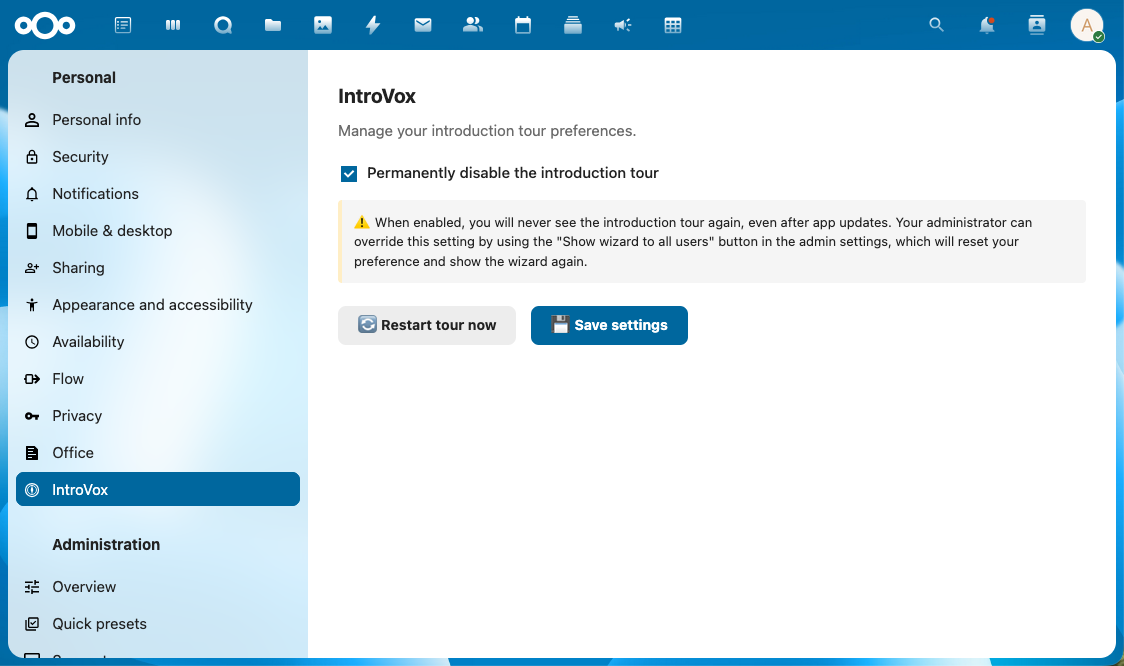
Accessing Your IntroVox Settings
- Click your profile picture or username in the top right
- Select Personal Settings
- Scroll down the left sidebar and click IntroVox
Available Options
In your personal settings you can:
- Restart the tour — see the guided tour again
- Permanently disable the tour — never show it again, even after updates
Restarting the Tour
Method 1 — From Personal Settings
- Navigate to Personal Settings → IntroVox
- Click 🔄 Restart tour now
- You'll be redirected to the dashboard
- The tour starts automatically
Method 2 — Browser Console (Advanced)
- Press F12 to open Developer Tools
- Go to the Console tab
- Type:
- Press Enter
This works only when you're already logged in and on a Nextcloud page.
When to Restart
- After a major Nextcloud update (new features may be added to the tour)
- When learning Nextcloud for a project or new role
- To refresh your knowledge after not using Nextcloud for a while
- To show Nextcloud to a colleague or friend
Permanently Disabling the Tour
If you never want to see the tour automatically again, you have three options:
From the Welcome Step
- On the first step, click Skip and don't show again
- The tour permanently disables and closes immediately
From Personal Settings
- Personal Settings → IntroVox
- Check "Permanently disable the introduction tour"
- Click 💾 Save settings
By Completing the Tour
Clicking Done on the final step also sets the permanent-disable preference.
Note: Even after permanently disabling, you can still restart the tour manually from Personal Settings → IntroVox. The "permanent disable" only affects automatic startup. Your administrator can also force-show the tour to everyone, including users who disabled it.
Temporary Dismissal
If you're busy and want to skip the tour for now without permanently disabling it:
- Click ✕ in the top-right corner
- The tour closes, but will appear again next login
This is useful if you're interrupted and want to complete it later.
"Tour Unavailable" Message
You might see this message in personal settings instead of the restart button:
"The introduction tour is currently disabled by your administrator"
Your Nextcloud administrator turned off the tour for all users. Contact your administrator if you'd like to see it.
Earlier IntroVox versions also showed a "not available in your language" message when an admin had restricted languages. Since v1.7.0 the tour is available in every Nextcloud-supported language automatically (via Transifex), so this message no longer exists.
See Also
- Taking the Tour — How to navigate the tour
- Troubleshooting — When things don't work
- FAQ — Common questions