MetaVox Flow Integration
MetaVox integrates with Nextcloud's Flow (Workflow Engine) to enable metadata-based automation and access control.
Overview
With Flow integration, you can create rules like: - Block access to documents marked as confidential - Tag files automatically based on their metadata
The MetaVox check is only available in the admin Flow settings. Personal Flow rules (Settings > Personal > Flow) cannot use it: a personal rule could test values of files the user only reaches through a share. The server refuses a rule with the MetaVox check from anyone who is not a Nextcloud administrator (delegated Flow admins included), also when it is posted to the Flow API directly.
Prerequisites
- MetaVox installed and configured
- For access control: Install Files Access Control app from the Nextcloud App Store
Setting Up Flow Rules
Creating a Rule
- Go to Settings > Administration > Flow
- Click Add new flow
- Select a trigger (e.g., "File accessed", "File created")
- Under Conditions, click Add condition
- Select "MetaVox metadata" from the dropdown
- Configure your condition:
- Metadata field: Select the metadata field to check
- Operator: Choose from the operators for that field type
- Value to check: Enter the value to compare against (hidden for is empty, is not empty, is checked and is not checked)
- Team folder (optional): Auto-detect (the default) or one specific team folder
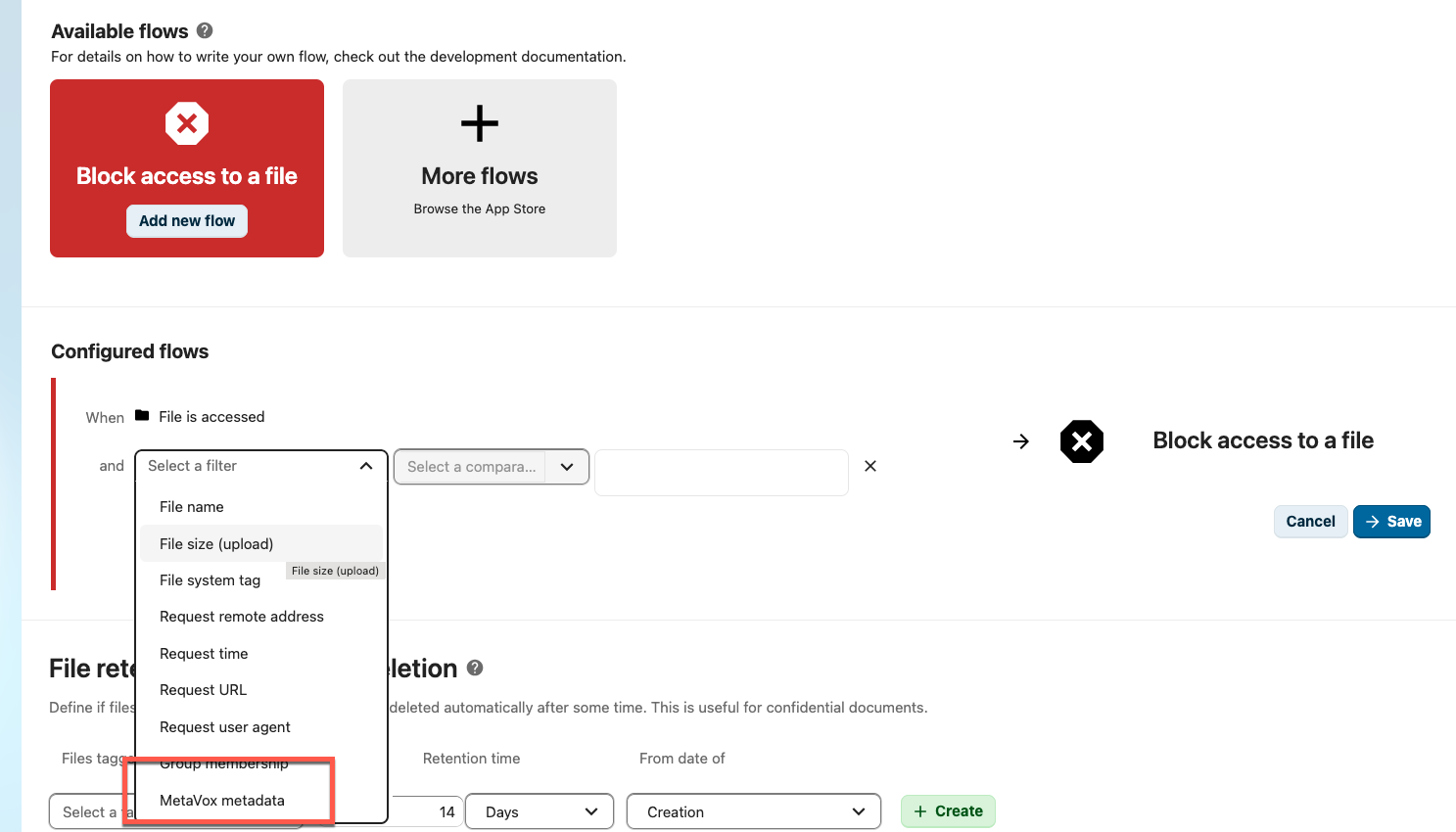
Which Files a Rule Applies To
- Files in a team folder only. The check looks up the team folder the file is in. Files outside a team folder never match, and neither do files in a team folder's trash or versions.
- Files, not folders. The check never matches a folder.
- Team folder (optional): with Auto-detect, the rule applies in every team folder. Pick a team folder and the rule only applies to files in that one; files in other team folders never match.
- The file's own values. The check compares the value stored on the file. The field list also offers Team folder metadata fields, but their value belongs to the team folder, not to the file, so the check sees them as empty.
Available Operators
The operator list depends on the field type. It is the list of the highlight rules in the grid, without the two that count days from today, and a rule reads the same in both:
| Field type | Operators |
|---|---|
| Text, Long Text | equals, is not, contains, does not contain, is empty, is not empty |
| Number | equals, is not, greater than, less than, greater or equal, less or equal, is empty, is not empty |
| Date | is before, is after, equals, is empty, is not empty |
| Dropdown | equals, is not, is one of, is empty, is not empty |
| Multi-select | is one of, contains all, is empty, is not empty |
| Checkbox | is checked, is not checked |
| URL | equals, is not, contains, does not contain, is empty, is not empty |
| User | equals, is not, is empty, is not empty |
| File Link | is empty, is not empty |
How they compare:
| Operator | Description |
|---|---|
| equals / is not | Exact match (or not), not case-sensitive |
| contains / does not contain | Value contains the text (or not), not case-sensitive |
| is empty / is not empty | Field has no value / has a value |
| is before / is after | Date is before / after the given value; both are compared as points in time |
| greater than, less than, greater or equal, less or equal | Numeric comparison; a value that is not a number never matches |
| is one of | Dropdown: the value is one of the selected options. Multi-select: the file has at least one of them |
| contains all | Multi-select: the file has every selected option |
| is checked / is not checked | Checkbox; one that was never set counts as not checked |
A multi-select is compared per option, not as text: "is one of IT" does not match a file that has only "IT-beheer".
For date fields the value picker switches automatically: date-only fields use
a date input, fields with Include time component enabled use a
datetime-local input.
Rules made earlier keep working and keep their operator in the form: a checkbox rule with equals "Yes (checked)" or "No (unchecked)", or a multi-select rule with contains, which is shown as is one of now. Earlier, a multi-select rule with contains or contains all did not match files with more than one option; it does now.
The server also accepts the operators matches and !matches (regular expression) for rules created through the Flow API.
Field-Specific Input
The value input adapts to the field type: - Dropdown fields: The configured options; is one of allows several - Multi-select fields: The configured options, several at once - Checkbox fields: no value; the operator says it - Date fields: Date picker (with time when the field includes time) - Number fields: Numeric input - Other fields: Free text input
Example Use Cases
Block Access to Confidential Files
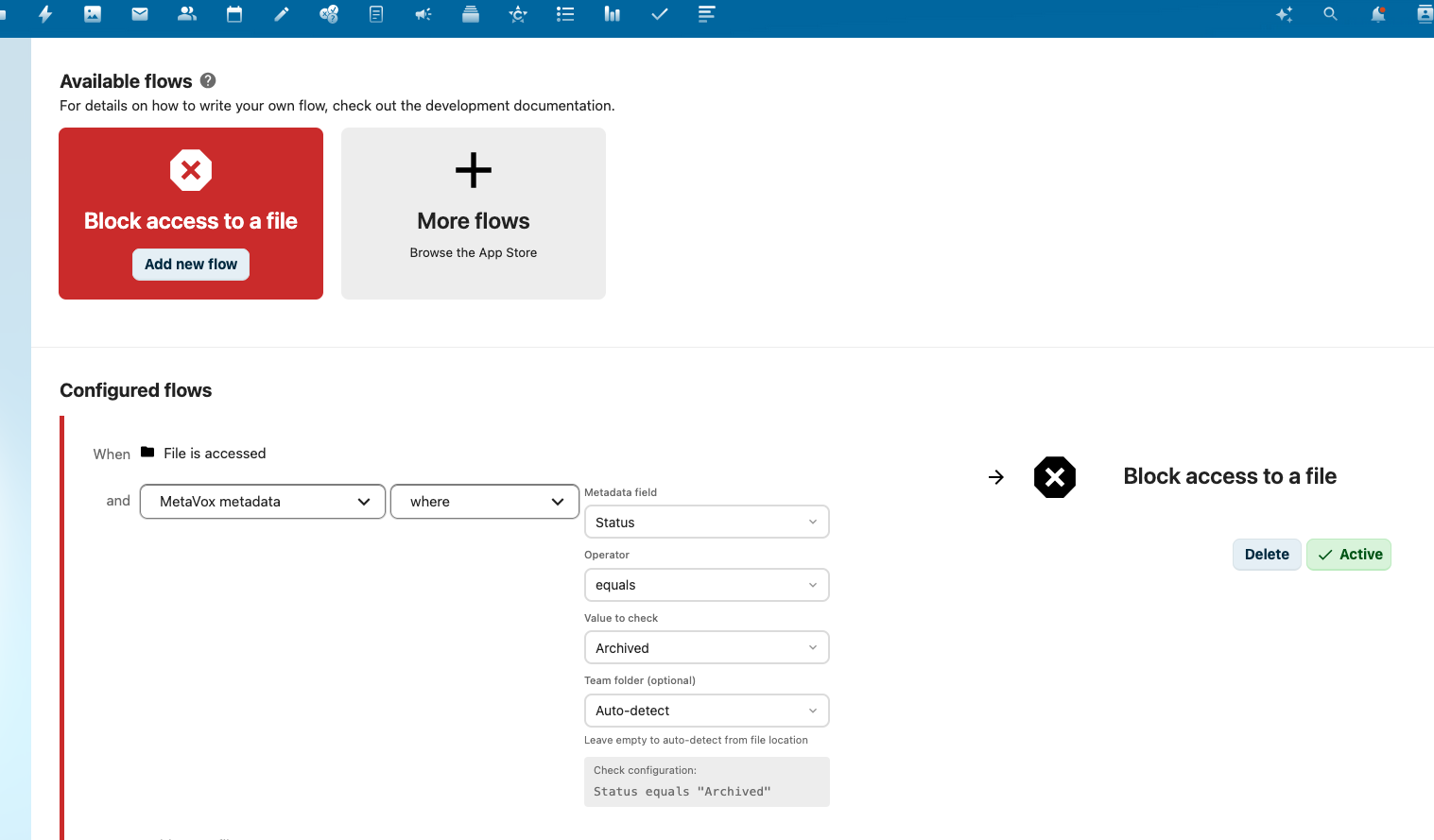
- Create a Flow rule with trigger "File accessed"
- Add condition: MetaVox metadata >
classificationequalsconfidential - Add action: Block access
Result: Users cannot access files marked as confidential unless the condition is changed.
Block Access to Unreviewed Documents
- Create a Flow rule with trigger "File accessed"
- Add condition: MetaVox metadata >
review_statusis one ofdraft,in review - Add action: Block access
Result: Documents that haven't been reviewed cannot be opened or downloaded. Files without a review status are not blocked by this rule; add a second rule with is empty if they should be.
Auto-Tag Based on Metadata
- Create a Flow rule with trigger "File created"
- Add condition: MetaVox metadata >
departmentequalsLegal - Add action: Add tag "legal-team"
Result: Files created in the Legal department are automatically tagged.
Tips
- Field grouping: The field list has two groups: "File metadata fields" and "Team folder metadata fields"
- Testing: Test rules with non-critical files first
- Logging: Check Nextcloud logs if rules don't trigger as expected; a failed check is logged as "MetaVox Flow check failed"
Admin vs Personal Flow
| Action | Where to configure | Scope | MetaVox check |
|---|---|---|---|
| Block access to a file | Settings > Administration > Flow | Applies to all users | Available |
| Send notification | Settings > Personal > Flow | Applies to you only | Not available |
Notification flows are personal in Nextcloud, so they cannot use MetaVox metadata as a condition.
Limitations
- Flow rules evaluate when triggers fire (file access, creation, etc.)
- Metadata changes alone may not trigger rules unless combined with file events
- Complex conditions may require multiple rules
See Also
- Compliance Templates - Pre-built metadata schemas with Flow examples
- Permissions - Access control basics
- Architecture Overview - How Flow integration works technically