AI Autofill
MetaVox can automatically suggest metadata values for files using Nextcloud's AI task processing framework.
Prerequisites
- A Nextcloud AI task processing provider installed (e.g., the LLM2 app or an external provider)
- AI enabled in MetaVox admin settings
How It Works
- Open a file's metadata sidebar
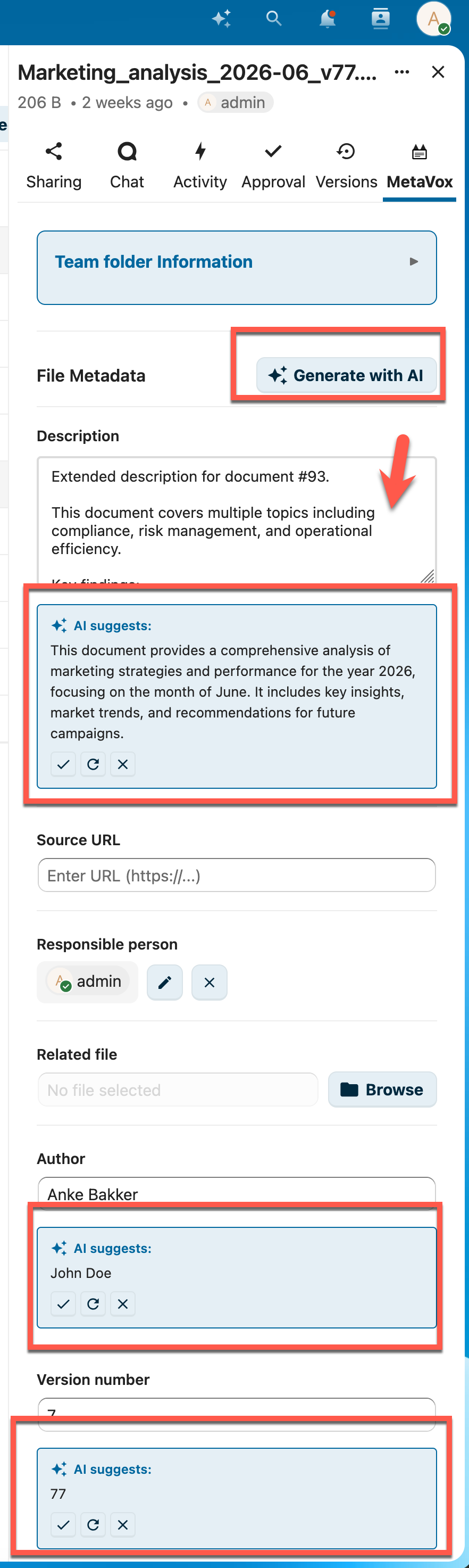
- Click the AI Autofill button
- MetaVox analyzes the file (name, path, content for supported formats) and generates metadata suggestions
- Review each suggestion — accept or reject individually
- Click Regenerate to get new suggestions for rejected fields
Supported File Formats
AI can extract content from: - PDF files (text extraction) - DOCX files (Word documents) - ODT files (OpenDocument text)
For other file types, AI uses the file name and path as context.
Enabling AI
Via Admin Settings
- Go to Settings > Administration > MetaVox
- Toggle Enable AI metadata generation on
Via API
curl -X POST "https://your-nextcloud.com/apps/metavox/api/settings" \
  -H "Content-Type: application/json" \
  -b "session-cookie" \
  -d '{"ai_enabled": true}'
Checking AI Availability
Response:
AI is available when both conditions are met: 1. An AI task processing provider is installed in Nextcloud 2. AI is enabled in MetaVox admin settings
How Suggestions Work
- AI respects field types: dropdown fields only receive suggestions from configured options
- Previously rejected suggestions are passed to the AI so it generates different values
- Each field suggestion can be accepted or rejected independently
- Suggestions are not saved automatically — you choose what to keep
See Also
- User Guide - General usage
- Field Types - Available field types
- Settings - Admin settings