Calendar Patch — Visual Room Browser
RoomVox includes an optional patch for the Nextcloud Calendar app (v6.2.0) that adds a visual room browser. This replaces the standard minimal resource picker with a comprehensive room browsing experience.
What the Patch Does
Standard Nextcloud Calendar Resource Picker
The default resource picker in Nextcloud Calendar is minimal:
- Search only — you must know the room name to find it
- Max 3 suggestions — only shows 3 rooms based on capacity
- No browsing — cannot see all available rooms at once
- No grouping — no building/floor structure
- Hardcoded filters — only Projector, Whiteboard, Wheelchair accessible
Patched Room Browser
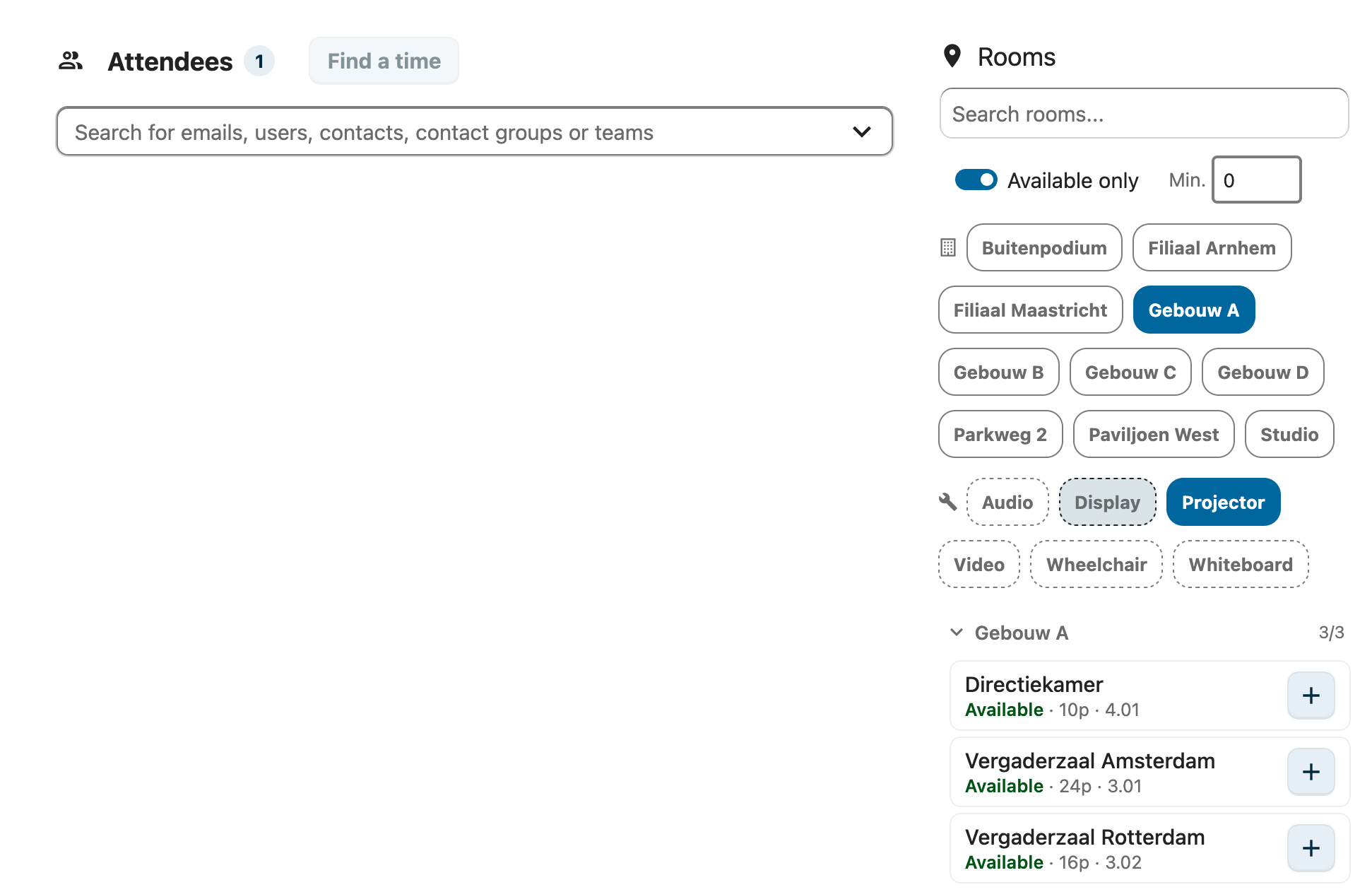
The patch replaces the resource picker with a full room browser:
| Feature | Standard | Patched |
|---|---|---|
| All rooms visible | No (search or max 3 suggestions) | Yes, all rooms at once |
| Building grouping | No | Yes, expand/collapse per group |
| Availability status | Only in search results | Per room, real-time |
| Text search | Name only via DAV roundtrip | Client-side on name, building, address, floor |
| Available-only filter | Checkbox in search | Toggle that filters entire list |
| Min. capacity filter | In search form | Inline filter |
| Building filter | No | Dynamic chips, multi-select |
| Facility filter | 3 hardcoded checkboxes | Dynamic chips based on actual room features |
| Room cards | Name in dropdown only | Card with status, capacity, floor, add/remove |
Room Card Component
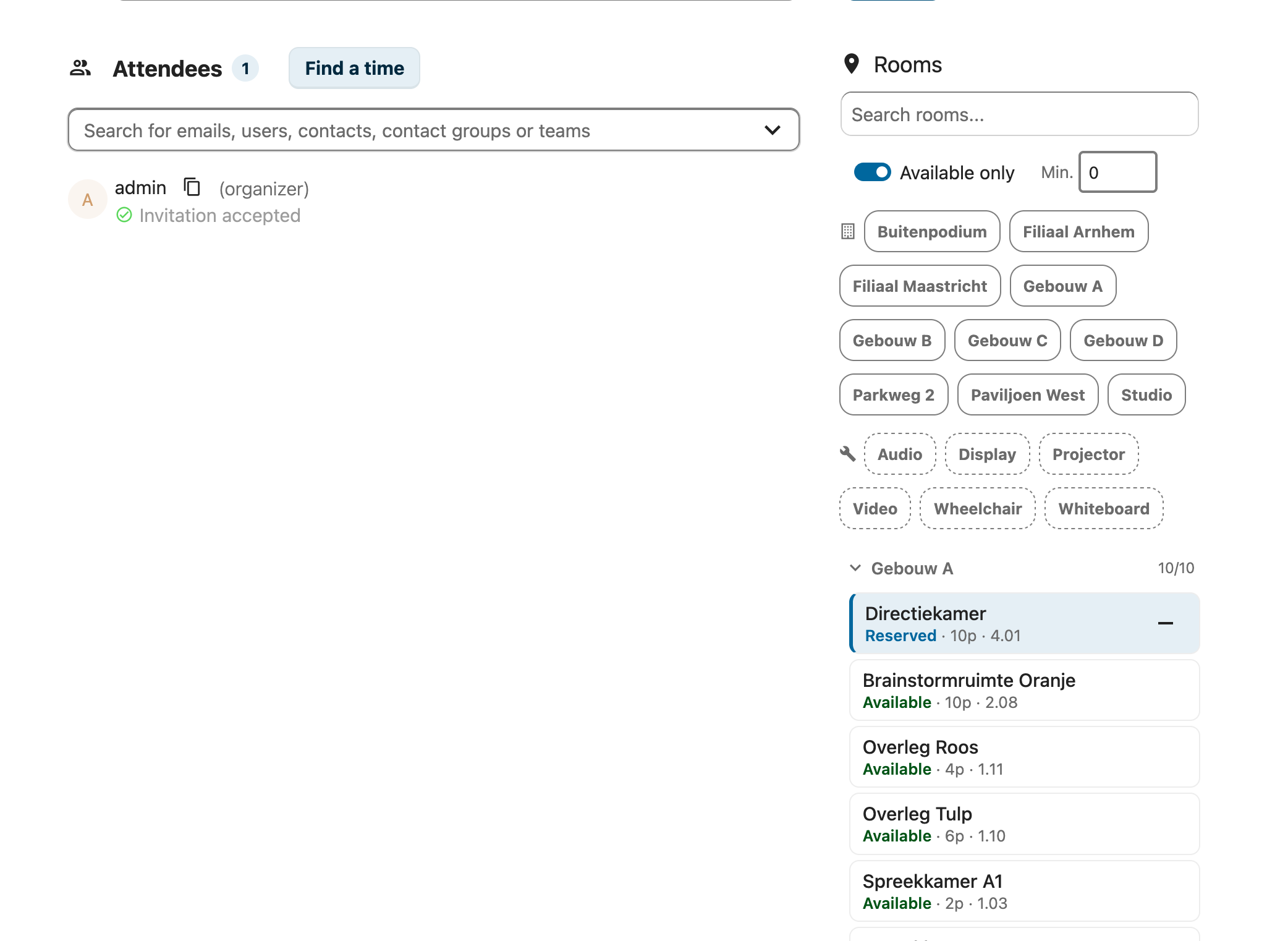
Each room is displayed as a compact card showing:
- Room name (bold)
- Status badge: Available (green) / Unavailable (red) / Reserved (blue)
- Capacity (e.g., "120p")
- Floor/location
- Full address on hover (tooltip)
- Add/remove button (+/-)
- Visual states: added (blue border), unavailable (dimmed)
Installation
Prerequisites
- Nextcloud Calendar app v6.2.0 installed
- The
nc-calendar-patch/directory in the RoomVox repository
Deploy
The deploy script:
1. Clones NC Calendar v6.2.0 to /tmp/nc-calendar-build
2. Copies the patch files over the stock files
3. Builds the entire calendar app with webpack
4. Uploads only the js/ directory to the server
Rollback
Each deployment creates a backup. To restore:
# Restore the backup created during deployment
ssh user@SERVER 'sudo rm -rf /var/www/nextcloud/apps/calendar/js && sudo mv /var/www/nextcloud/apps/calendar/js.bak.YYYYMMDD_HHMMSS /var/www/nextcloud/apps/calendar/js'
Patched Files
nc-calendar-patch/src/components/Editor/Resources/
  ResourceList.vue          # Replaces stock completely (613 lines vs 244 stock)
  ResourceRoomCard.vue      # New component
  ResourceListSearch.vue    # Unchanged (no longer used)

nc-calendar-patch/src/components/Editor/Invitees/
  AttendeeChip.vue          # Adds 'Busy at this time' indicator
  InviteesChipList.vue      # 'Show less' / 'Drop here to make optional'

nc-calendar-patch/src/models/
  principal.js              # Extended with room metadata fields
  resourceProps.js          # Room types + facility labels (translatable)

nc-calendar-patch/src/views/
  EditFull.vue              # Hybrid meeting toggles (In-person / Online (Talk))
Translations
Strings that are specific to the RoomVox patch — In-person, Online (Talk), Reserved, Suggested conference rooms, room types like Meeting room, facility labels like Projector, etc. — are not in the upstream Nextcloud Calendar translation bundles. The patch resolves them through the roomvox translation namespace via $t('roomvox', '…') (or t('roomvox', '…') from @nextcloud/l10n in JS files), so they pick up translations from RoomVox's own l10n/{lang}.{json,js} bundles.
Languages currently shipped: English (source), German, Dutch, French. Adding a new language means adding a l10n/<lang>.{json,js} to the RoomVox app — no calendar-app changes needed.
Strings that already exist upstream (Accepted, Declined, Cancel, Optional, Required, Available, etc.) keep using the calendar namespace so they stay in sync with Nextcloud's regular translations.
Data Flow
- On mount: load all room principals via
principalsStore.getRoomPrincipals - Check availability via
checkResourceAvailability()(free/busy query) - Group rooms by
roomBuildingName, sort by availability + name - Client-side filtering on text, building, capacity, facilities, availability
- Add: call
calendarObjectInstanceStore.addAttendee()with room data - Remove: find attendee by email, call
removeAttendee()
DAV Property Mapping
The patch extends principal.js to map additional DAV properties:
| Property | DAV Namespace | Usage |
|---|---|---|
roomBuildingName |
{urn:ietf:params:xml:ns:caldav}room-building-name |
Building grouping + filter chips |
roomBuildingAddress |
{urn:ietf:params:xml:ns:caldav}room-building-address |
Address tooltip |
roomFloor |
{http://nextcloud.com/ns}room-building-story |
Floor display in room card |
These properties are populated from the room's address and room number fields in RoomVox.
Nextcloud 33 Compatibility
When upgrading to Nextcloud 33:
- Calendar app structure unchanged — v6.2.0 is also shipped with NC33
resource_booking_enabledguard — NC33 adds a check that hides the resource picker if no room backend is registered. RoomVox registers a backend, so the flag is automatically true- Full-page event editor — NC33 replaces the sidebar with a full-page layout. Patch CSS should be tested
@nextcloud/vuev8.x — No breaking changes for the components used by the patchX-NC-DISABLE-SCHEDULING— New property that skips scheduling. The SchedulingPlugin should respect this
Updating After NC Upgrades
If Nextcloud or the Calendar app is updated:
- Check if the Calendar app version has changed
- If unchanged, redeploy the patch:
./deploy-calendar.sh <target> - If the Calendar app was updated, review the stock files for changes and update the patch accordingly
- Always test the room browser after updates