Admin Settings Reference
Reference for every option in Settings → Administration → IntroVox.
Admin Tour
The first time an admin opens IntroVox's settings, a short tour of the page starts, in the same style as the tour users get: the four parts, the welcome tour and tours for apps, languages, how to make a step in four moves, the preview and the switch that turns the tour on for everyone, with a link to this manual at the end. Every admin sees it once. Show the admin tour again under Support runs it again.
On an instance where nobody has been asked yet, the tour ends with the question whether to share anonymous usage statistics; see Telemetry. The question is asked once per instance. While IntroVox's settings are open, the tour users get does not start there; it starts on the next page.
Global Settings
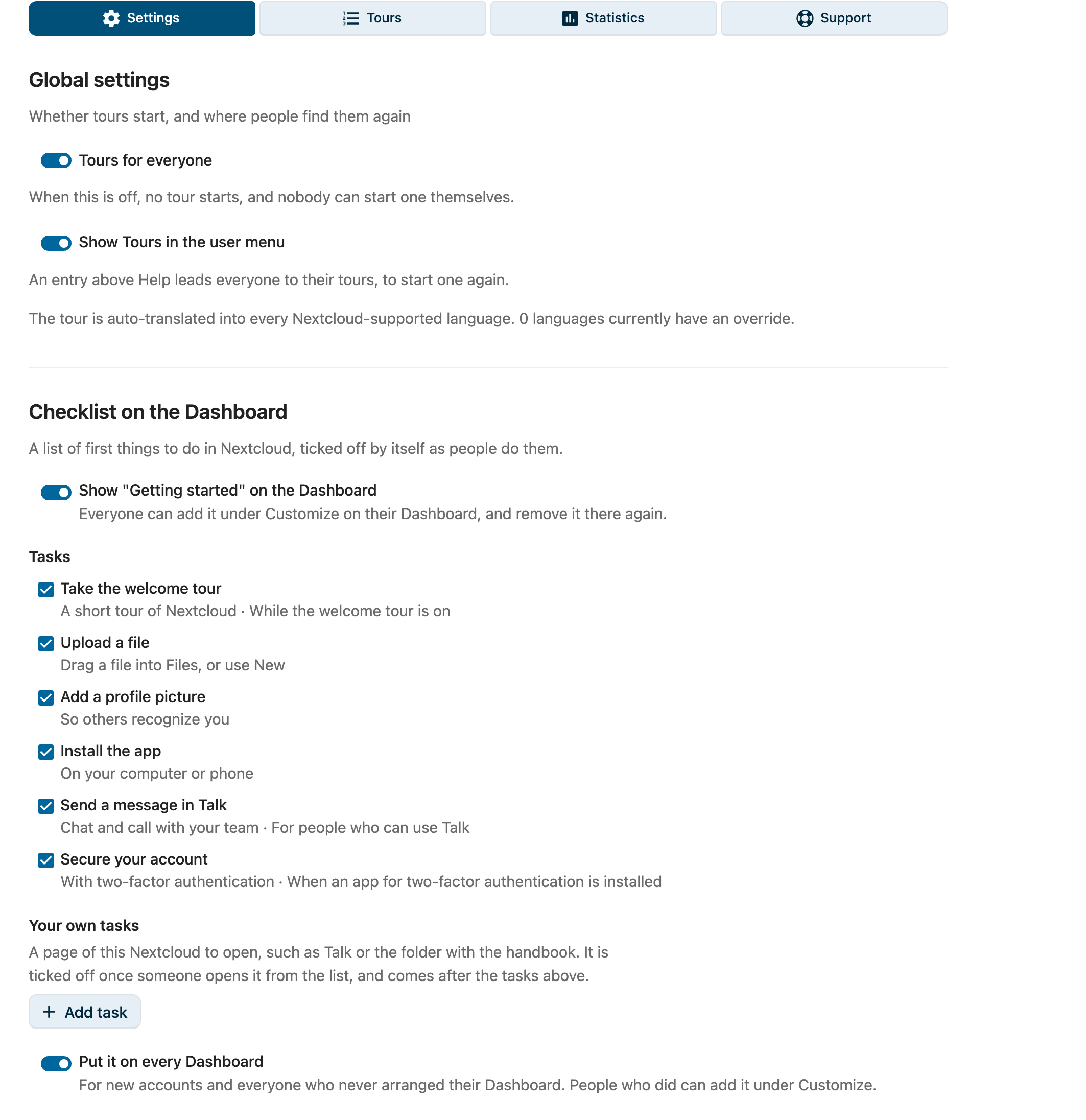
Tours for Everyone
Location: Top of the Settings pane under Global settings (before tours per app, this switch was called Enable wizard for all users)
Function: Master switch for all tours: the welcome tour and the tours for apps and pages.
| State | Behavior |
|---|---|
| ✅ On | Tours are on. New users get the welcome tour automatically after their first login, in their Nextcloud language. Tours that you switched on under Tours start the first time someone opens their app or page, or on the next page for a tour that starts anywhere. Users can start tours by hand via personal settings. On after installing. |
| ☐ Off | No tour starts: neither the welcome tour nor a tour for an app, and users can't start one by hand. Users see "The introduction tour is currently disabled by your administrator." |
Storage: appconfig key wizard_enabled ('true' / 'false'); the key kept its old name
Use case: Useful during maintenance or when you want to temporarily disable the onboarding experience without losing your step configuration.
Show Tours in the User Menu
Location: Under the Tours for everyone switch
Function: Puts Tours in every user's menu (under their avatar), just above Help. It leads to Personal settings → IntroVox, where users start any tour again. Shown only while Tours for everyone is on. On by default; saved straight away.
Storage: appconfig key user_menu ('true' / 'false')
Language Coverage
Location: A read-only hint line under the Tours for everyone switch
Function: Tells you how many languages currently have an admin override. There is no per-language opt-in; every Nextcloud-supported language is automatically available to end users via the Transifex-translated defaults (nextcloud/introvox resource). Override management itself happens in a tour's step editor (Tours → Edit steps) — see Language Management.
Checklist on the Dashboard
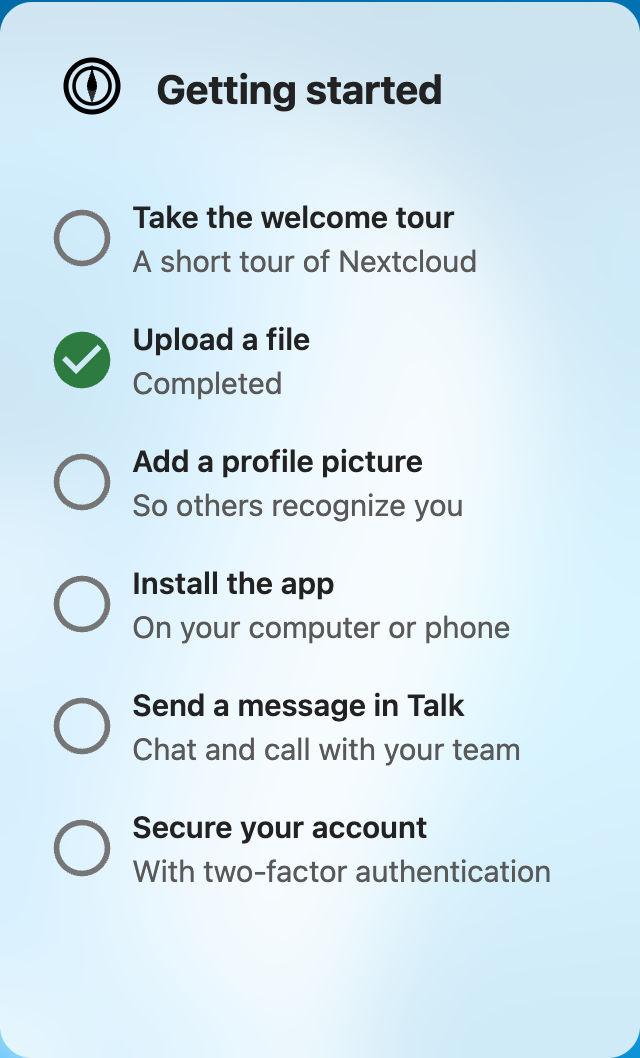
Location: Below Global settings
Function: Show "Getting started" on the Dashboard offers everyone a list of first things to do in Nextcloud, as a Dashboard widget. Off by default. Each task links to where it is done, and ticks itself off when the user has done it; nobody ticks anything by hand. Once everything is done, the list says so. Like any widget, people add it and remove it under Customize on their Dashboard; the Nextcloud mobile apps show it too.
Tasks (pick the ones you want; at least one):
| Task | Done when |
|---|---|
| Take the welcome tour | The user finished the welcome tour. Only while the welcome tour is on |
| Upload a file | The user uploaded a file to their own files, from the web page or a client. The files a new account starts with do not count |
| Add a profile picture | The user set a picture of their own |
| Install the app | A desktop client or a Nextcloud mobile app signed in to the account |
| Send a message in Talk | The user wrote a message in Talk. Only for people who can use Talk; the conversations Talk starts every account with do not count |
| Secure your account | The user turned on a second factor (backup codes do not count). Only when an app for two-factor authentication is installed |
Your own tasks: Add task makes a task of your own, with a title, a short text and a page of this Nextcloud, such as /apps/spreed/ for Talk, /apps/files/?dir=/Handbook for a folder, or a full address of this Nextcloud. It is ticked off once someone opens it from the list, and comes after the tasks above. At most 10; write them in your users' language, as they are not translated. Deleting one also forgets who opened it.
Put it on every Dashboard: adds the list to the Dashboard of new users and of everyone who never arranged their own; people who did keep their layout and can add it under Customize. This changes the Dashboard's default layout (dashboard app, key layout); switching it off takes the list out again.
Storage: appconfig keys checklist_enabled ('true' / 'false'), checklist_tasks (JSON list of task ids) and checklist_custom (your own tasks); see also Where settings are stored
Tours
The Tours pane lists the Welcome tour, the tours marked Built-in (Files, Talk, Deck and Calendar, once their app is installed), and tours of your own that start in an app, on another page, or anywhere. Each has an on/off switch, Edit steps, and a ⋯ menu with Preview, Copy link, Export tour, Show again to everyone and (not for the welcome tour or a built-in tour) Delete. New tour makes a tour for an app, a page, or anywhere; Import tour adds one from a file, with Upload a file or Choose from Files. See Tours.
Show Again to Everyone
Show again to everyone in a tour's ⋯ menu gives that tour again to everyone who saw it. For the Welcome tour it:
- Raises the welcome tour's version counter (
wizard_version) - Clears each user's "welcome tour done" mark (
wizard_disabled), set by Done or Skip and don't show again - Starts the welcome tour again, on the next page they open, for everyone who saw it
For any other tour it raises that tour's version, so it starts once more for everyone who saw an older one.
Note: Users who switched off Start tours by themselves in their personal settings keep that. The tour does not start by itself for them; they can still start it from their personal settings.
Override Picker (in a tour's step editor)
Select Language to Edit
Location: Top of a tour's step editor: open Tours and click Edit steps on the tour (the Welcome tour for the tour new users get). All tours goes back to the list.
Function: Picks which language's override you're editing. The step list below the dropdown reloads with that language's override content (or the auto-translated defaults if no override exists yet).
Behavior:
- The dropdown lists English plus every language that currently has an admin override row
- The Add language override button opens a searchable picker over the full Nextcloud language list; no DB row is written until you save
- Changes only apply to the selected language
- If you switch languages with unsaved changes, you're warned
For full override workflow see Language Management.
Step Management
The step management section, in the same step editor, is detailed in Managing Tour Steps. The available controls are:
| Control | Action | Reference |
|---|---|---|
| Add step | Create a new wizard step | Managing Steps → Add |
| Preview tour | Run the tour in a preview, optionally as a group | Managing Steps → Preview |
| Edit | Modify an existing step | Managing Steps → Edit |
| Image or video | An image, GIF or video above the step's text | Managing Steps → Image or Video |
| Pick element | Point at the element a step highlights | Managing Steps → Pick an Element |
| Continue with | Next button, Click on the element or Filling in the field | Managing Steps → Click to Continue |
| Test this step | Show one step in a preview, unsaved edits included | Managing Steps → Preview |
| Delete | Remove a step | Managing Steps → Delete |
| Drag handle, Move step up / Move step down | Reorder steps, with the mouse or the keyboard | Managing Steps → Reorder |
| Switch | Enable/disable individual steps | Managing Steps → Enable/Disable |
| Translate with AI | Translate the steps of this language into other languages; only with a provider for the Nextcloud Assistant | Tours → AI |
| Write steps with AI | Write new steps from a description; only with a provider for the Nextcloud Assistant | Tours → AI |
| Export | Download the steps of this language as JSON | Import/Export |
| Import | Upload steps from JSON | Import/Export |
| Reset | Delete the current language's override row; next request serves auto-translated defaults | Managing Steps → Reset |
| Save changes | Only shown after a failed save, to try again; changes are otherwise saved as you make them | Managing Steps → Saving |
| Tour settings | The tour's name, main language, groups, Who gets it and when it starts by itself | Tours → Make a Tour |
Where Settings Are Stored
| Setting | Backend storage |
|---|---|
| Tours for everyone | appconfig → wizard_enabled |
| Tours in the user menu | appconfig → user_menu |
| Welcome tour version (Show again to everyone) | appconfig → wizard_version (integer) |
| Per-language overrides (welcome tour) | appconfig → wizard_steps_<lang> (JSON array, only present when admin saved an override) |
| Every tour's settings, including its on/off switch (for a built-in tour only what you changed) | appconfig → tours (JSON array) |
| Steps of any other tour | appconfig → tour_steps_<tour>_<lang> (JSON array; a built-in tour has none until you change a language) |
| Welcome tour counters | appconfig → wizard_started_count, wizard_completed_count, wizard_skipped_count (sent with the anonymous usage statistics, see Telemetry) |
| Welcome tour done, per user | preferences → introvox / wizard_disabled ('true' after Done or Skip and don't show again) |
| Welcome tour started, completed, skipped, per user | preferences → introvox / wizard_started, wizard_completed, wizard_skipped (time, set once; wizard_completed also ticks off Take the welcome tour in the checklist) |
| Start tours by themselves, per user | preferences → introvox / tours_disabled ('true' = switched off) |
| Other tours seen, per user | preferences → introvox / tour_<tour>_seen (the tour's version when it last started) |
| Other tours completed or skipped, per user | preferences → introvox / tour_<tour>_completed, tour_<tour>_skipped (time, set once) |
| How far a tour got, per user | preferences → introvox / tour_<tour>_reached (the tour's version, and the step and its place, of the last run that started by itself; tour_welcome_reached for the welcome tour) |
| Admin tour seen | preferences → introvox / admin_intro_done (per admin) |
| Telemetry question asked | appconfig → telemetry_asked (time it was first shown) |
| Telemetry choice | appconfig → telemetry_enabled (absent until an admin chooses) |
| Checklist on the Dashboard | appconfig → checklist_enabled, checklist_tasks (JSON list; absent means all tasks) |
| Checklist on every Dashboard | appconfig → dashboard / layout (the Dashboard's own default layout) |
| A file uploaded, per user (checklist) | preferences → introvox / checklist_uploaded (time it was first found) |
| Own checklist tasks | appconfig → checklist_custom (JSON list: id, title, text, page) |
| Own task opened, per user | preferences → introvox / checklist_<id> (time it was opened from the list) |
| Images and videos in steps | IntroVox's app data folder, media and media-meta |
| Deleted tours (the last ten) | IntroVox's app data folder, backups |
Deleting a tour also deletes its tour_<tour>_* keys for every user.
On the update to 2.0.0, users who had switched the tour off on purpose in their personal settings (they had started the welcome tour, neither finished nor skipped it, and had Permanently disable the introduction tour on) get Start tours by themselves switched off, once. Users who finished or skipped the welcome tour keep getting tours for apps.
Installs upgraded from 1.6.x may still carry a stale
enabled_languagesappconfig row. The 1.7.0 code ignores it; it's left in place for downgrade safety and can be removed withocc config:app:delete introvox enabled_languages.
See Backend Architecture for the full storage model.