Public API
RoomVox exposes a Bearer-token authenticated REST API at /api/v1/* for external integrations — digital signage, room displays, kiosks, scheduled imports, and third-party booking flows.
For the full endpoint reference, see API Reference → Public API v1.
When to Use the Public API
| Use case | Why |
|---|---|
| Room displays / tablets outside meeting rooms | Show current and upcoming bookings; allow walk-in bookings |
| Lobby kiosks / digital signage | Display available rooms with capacity and facilities |
| Scheduled CSV imports | Periodic sync from an HR or facility-management system |
| Reservations from a third-party booking flow | Custom front-end backed by RoomVox as the booking engine |
| Statistics dashboards | Pull usage data for BI / reporting |
| Programmatic iCal feeds | Calendar sync for tools that support Bearer-authenticated CalDAV-like feeds |
Creating an API Token
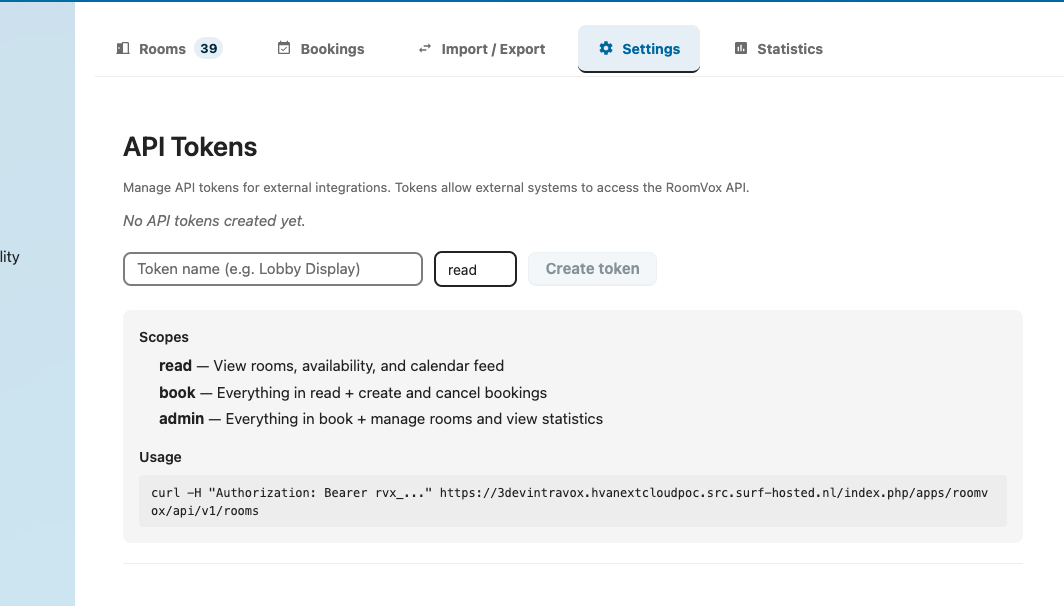
- Settings → Administration → RoomVox → Settings tab
- Scroll to API Tokens
- Enter a token name (e.g.,
Lobby Display) - Choose a scope:
read,book, oradmin - Optional: restrict to specific rooms
- Optional: set an expiration date
- Click Create token
- Copy immediately — the token is shown only once. After creation only the prefix (
rvx_xxxx...) is shown
Scopes
| Scope | Allows |
|---|---|
read |
List rooms, read bookings, read availability, read iCal feed |
book |
Above + create bookings |
admin |
Above + statistics + admin operations |
Tokens can be optionally restricted to specific rooms — useful for room-display deployments where one device only needs access to one room.
Authentication
Every request includes a Bearer token in the Authorization header:
The header is case-insensitive (bearer works too). Tokens always start with rvx_.
Error Responses
| Status | Meaning |
|---|---|
401 — Missing or invalid Authorization header |
No header or wrong format |
401 — Invalid or expired API token |
Token revoked or past its expiration |
403 — Insufficient permissions |
Token scope too low, or restricted token tried to access a different room |
Common Endpoints
| Method | URL | Scope | Purpose |
|---|---|---|---|
GET |
/api/v1/rooms |
read |
List all rooms (filtered by token's room restriction) |
GET |
/api/v1/rooms/{id} |
read |
Get room details |
GET |
/api/v1/rooms/{id}/status |
read |
Current status — Available / Reserved with end time |
GET |
/api/v1/rooms/{id}/availability |
read |
Availability for a date range |
GET |
/api/v1/rooms/{id}/bookings |
read |
List bookings for a room |
POST |
/api/v1/rooms/{id}/bookings |
book |
Create a booking |
DELETE |
/api/v1/rooms/{id}/bookings/{uid} |
book |
Cancel a booking (optional ?recurrenceId= for single occurrence) |
GET |
/api/v1/rooms/{id}/calendar.ics |
read |
iCalendar feed (Bearer token) |
GET |
/api/v1/rooms/{id}/feed/{secret}/calendar.ics |
— (per-room secret) | Public iCalendar feed for external calendar apps and signage — no Bearer header |
GET |
/api/v1/statistics |
admin |
Usage statistics |
Full request/response schemas, examples, and error formats: API Reference → Public API v1.
Quick Example: Lobby Display
A typical room-display deployment showing current and upcoming bookings:
# Get current status
curl -H "Authorization: Bearer rvx_abc..." \
  https://nextcloud.example.com/apps/roomvox/api/v1/rooms/boardroom/status
Response:
{
  "id": "boardroom",
  "name": "Boardroom",
  "status": "available",
  "nextBooking": {
    "uid": "abc-123",
    "summary": "Quarterly review",
    "start": "2026-06-02T14:00:00+02:00",
    "end": "2026-06-02T15:30:00+02:00",
    "organizer": "alice@example.com"
  }
}
# Get next 24 hours of bookings
curl -H "Authorization: Bearer rvx_abc..." \
  "https://nextcloud.example.com/apps/roomvox/api/v1/rooms/boardroom/bookings?from=2026-06-02T00:00:00Z&to=2026-06-03T00:00:00Z"
Quick Example: Walk-In Booking from a Tablet
A tablet outside a meeting room lets a passing user book the room for 30 minutes:
curl -X POST \
  -H "Authorization: Bearer rvx_abc..." \
  -H "Content-Type: application/json" \
  -d '{
    "summary": "Quick sync",
    "start": "2026-06-02T11:00:00+02:00",
    "end": "2026-06-02T11:30:00+02:00",
    "organizerEmail": "walkin@example.com"
  }' \
  https://nextcloud.example.com/apps/roomvox/api/v1/rooms/boardroom/bookings
Behavior is identical to a booking made from a calendar app:
- Auto-accept rooms confirm immediately
- Non-auto-accept rooms create a Tentative booking and notify managers
- API-created bookings on non-auto-accept rooms correctly trigger approval emails (fixed in v1.1.1, see #14)
Rate Limits and Constraints
| Constraint | Limit |
|---|---|
Date range parameters (from/to) |
Max 365 days |
| CSV import file size | Max 5 MB |
| Token scope | Strictly enforced — read cannot create bookings |
| Token room restriction | Tokens restricted to specific rooms return 403 for other rooms |
Security
- Tokens are secrets — treat them like passwords
- Tokens are shown only once at creation — store securely
- Tokens can be revoked any time from the Settings tab — revocation is immediate
- Set expiration dates on tokens used for short-lived integrations
- Use room-restricted tokens for displays/kiosks — limits blast radius if compromised
- Public API requests are logged with token prefix in
nextcloud.log
See Also
- API Reference — full endpoint documentation
- Admin Settings → API Tokens — token management UI
- Backend Architecture — API token middleware