Confluence Import
Import content from Confluence (Cloud, Server, or Data Center) into IntraVox. This document covers the user-facing import workflow, the supported macros and authentication methods, the underlying implementation, and the post-MVP fixes applied during stabilisation.
Table of Contents
Usage Guide
Prerequisites
- Admin access to your IntraVox installation
- Confluence credentials with read access to the space you want to import
- A stable internet connection for downloading pages and attachments
Supported Confluence Versions
IntraVox supports importing from:
- Confluence Cloud (Atlassian hosted)
- Confluence Server (v7.x – 8.x)
- Confluence Data Center (Enterprise on-premise)
The importer automatically detects your Confluence version based on the URL.
Authentication Setup
Confluence Cloud
- Create an API token at Atlassian Account Security. Give it a label (e.g. "IntraVox Import") and copy the token immediately — it cannot be displayed again.
- Required information:
- Confluence URL:
https://yoursite.atlassian.net/wiki - Email: your Atlassian account email
- API token
Confluence Server (v7.9+)
- In your Confluence profile, navigate to "Personal Access Tokens" and create a token with read permissions.
- Required information:
- Confluence URL:
https://confluence.yourcompany.com - Personal Access Token
Confluence Server (legacy)
For older Server installations without PAT support, basic authentication is available. This is less secure — prefer PATs when available.
- Confluence URL, username, and password
Import Process
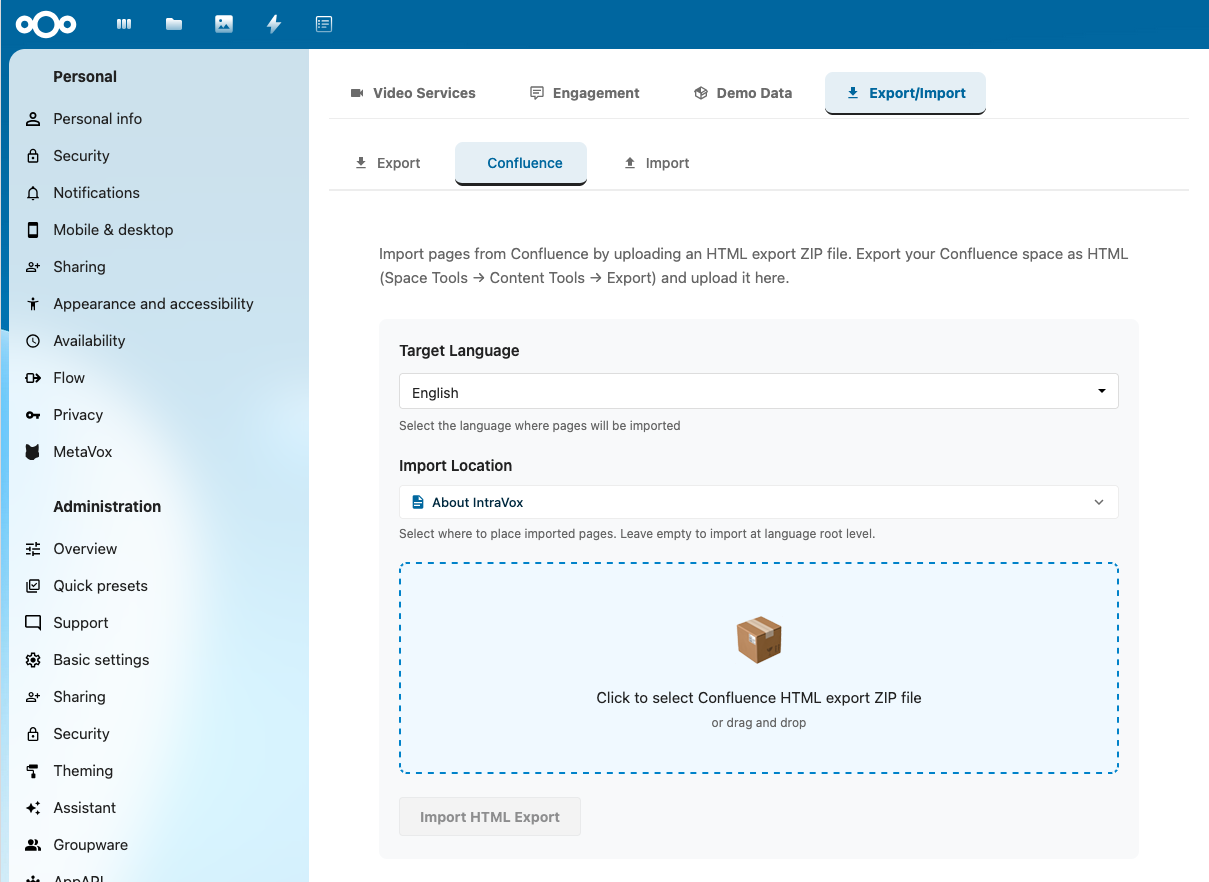
The Confluence import lives under Settings → IntraVox → Export/Import → Confluence. Pick the target language and parent page, then drop in an HTML export ZIP from Confluence (Space Tools → Content Tools → Export).
- Open the import panel — IntraVox admin panel → Settings → Export/Import → "Import from Confluence".
- Configure connection — enter the Confluence URL and credentials. The system automatically detects Cloud vs Server.
- Test connection — click "Test Connection" and verify the success message including the detected version.
- Load spaces — click "Load Spaces" and pick the space to import.
- Pick target language — choose which IntraVox language folder (
nl,en,de,fr) to import into. - Pick a parent page — choose the navigation location under which the imported space will appear.
- Start import — click "Import Space". Progress (pages imported, media downloaded) is shown in real time. Do not close the browser window during import.
- Verify — once the success banner appears, switch to the target language in the main view and browse the imported pages.
Import Performance
| Pages | Estimated time | Notes |
|---|---|---|
| 10 | ~30 seconds | Includes image downloads |
| 50 | 2–3 minutes | Rate limiting may apply |
| 100 | 5–7 minutes | Monitor for timeouts |
| 500+ | 20+ minutes | Consider XML backup import instead |
Performance depends on the number of pages, the number of attachments, Confluence server response time, and network speed.
Best Practices
Before import
- Test with a small space (5–10 pages) first to verify conversion quality.
- Clean up old or archived pages in Confluence — you do not need to import everything.
- Export the current IntraVox state if you have existing content, and keep the Confluence space accessible during transition.
After import
- Review page hierarchy, verify images and attachments loaded, test internal links.
- Recreate unsupported macros manually where needed (see Supported Macros).
- Configure IntraVox page permissions — Confluence permissions are not imported.
Supported Macros
Fully Supported
| Confluence macro | Converts to | Notes |
|---|---|---|
| Info panel | Text widget with blue styling | Preserves title and content |
| Note panel | Text widget with gray styling | Preserves title and content |
| Warning panel | Text widget with orange styling | Preserves title and content |
| Tip panel | Text widget with green styling | Preserves title and content |
| Error panel | Text widget with red styling | Preserves title and content |
| Code block | Text widget with syntax highlighting | 30+ languages supported |
| Images | Image widget | Downloaded and embedded |
| Attachments | File widget | Downloaded and linked |
| Expand/Collapse | HTML5 <details> element |
Native browser support |
Partially Supported
| Macro | Converts to | Limitations |
|---|---|---|
| Table of Contents | Placeholder text | Recreate manually |
| Attachments List | Placeholder text | Individual files are imported |
Not Supported
The following macros are converted to a placeholder text block indicating the original macro name:
- Jira Issue macro
- Include Page macro
- Roadmap macro
- Custom/third-party macros
Code Block Languages
The code macro supports syntax highlighting for JavaScript, TypeScript, Node.js, PHP, Python, Ruby, Perl, Java, C, C++, C#, Go, Rust, Scala, HTML, CSS, SCSS, SASS, SQL, JSON, YAML, XML, Bash, PowerShell, and 15+ more.
Troubleshooting
Connection Failed
Possible causes and fixes:
- Verify the Confluence URL is correct and reachable from your browser.
- Check credentials are valid; for Cloud, ensure the API token has not expired.
- For Server, verify firewall and network access from the Nextcloud server to Confluence.
No Spaces Listed
- Verify you have read access to at least one space.
- Check Confluence permissions and admin restrictions.
- Try alternative credentials.
Import Fails Partway Through
- Check Confluence rate limits — Cloud allows 100 requests/minute by default.
- Verify a stable internet connection.
- Try importing a smaller space first to isolate the issue.
- Check IntraVox server logs (Nextcloud
nextcloud.log) for specific errors.
Missing Images or Attachments
Common causes:
- Attachment download URLs not accessible from the Nextcloud server
- Network timeout during download
- Insufficient storage in the target GroupFolder
Fixes:
- Re-run the import with the same settings; existing pages will be skipped, missing media re-attempted.
- Manually upload missing attachments to the page's
_media/folder. - Check server logs for the specific download errors.
Rate Limiting
Confluence Cloud limits API requests to ~100/minute per user. If you hit the limit:
- Wait a minute and retry — limits reset.
- Import smaller spaces in sequence rather than one large space.
- Enterprise Atlassian plans allow higher limits — contact Atlassian to raise them.
JavaScript Module Loading Error After Update
If you see TypeError: can't access property "call", n[e] is undefined after an IntraVox update, your browser has cached old JavaScript:
- Mac: Cmd + Shift + R
- Windows/Linux: Ctrl + Shift + R
Macros Showing as Unsupported
For macros listed under "Not Supported" or "Partially Supported", recreate the content manually in IntraVox. If a macro you rely on heavily is not yet supported, file a feature request on GitHub Issues.
Implementation
Status
Confluence import is implemented for Cloud, Server, and Data Center editions, with automatic version detection and three authentication methods. The MVP shipped in IntraVox 0.8.0 (December 2025).
Architecture
Confluence Cloud / Server / DC
         ↓
ConfluenceApiImporter
  - Fetch pages via REST API
  - Parse Storage Format (XHTML)
  - Process macros (plugin system)
         ↓
IntermediateFormat
  - Normalized page structure
  - Content blocks (heading, html, code, panel, image, etc.)
  - Media download list
         ↓
AbstractImporter
  - Convert blocks → IntraVox widgets
  - Build layout structure
         ↓
Export JSON + ZIP
  - Standard IntraVox export format
  - Media files in _media folders
         ↓
ImportService
  - Write pages to GroupFolder
  - Import navigation/footer
  - Trigger file cache scan
File Structure
IntraVox/
├── css/
│   └── confluence-panels.css                  # Confluence panel styles
├── lib/Service/Import/
│   ├── IntermediateFormat.php                 # Data structures
│   ├── AbstractImporter.php                   # Base importer class
│   ├── HtmlToWidgetConverter.php              # HTML → Widget converter
│   ├── ConfluenceImporter.php                 # Storage Format parser
│   ├── ConfluenceApiImporter.php              # REST API client
│   └── Confluence/Macros/
│       ├── MacroHandlerInterface.php          # Plugin interface
│       ├── ConversionContext.php              # Helper class
│       ├── PanelMacroHandler.php              # Info/Note/Warning/Tip
│       ├── CodeMacroHandler.php               # Code blocks
│       ├── AttachmentMacroHandler.php         # Images/Files
│       ├── ExpandMacroHandler.php             # Expand/Collapse
│       └── DefaultMacroHandler.php            # Unsupported fallback
└── src/admin/components/
    └── ConfluenceImport.vue                   # Frontend component
Modified existing files: lib/Controller/ImportController.php (3 Confluence methods added), appinfo/routes.php (3 routes registered), src/components/AdminSettings.vue (component embedded).
API Endpoints
Test Connection — POST /apps/intravox/api/import/confluence/test
{
  "baseUrl": "https://yoursite.atlassian.net/wiki",
  "authType": "api_token",
  "authUser": "user@example.com",
  "authToken": "your-token"
}
Response:
List Spaces — POST /apps/intravox/api/import/confluence/spaces (same request body as test connection)
{
  "success": true,
  "spaces": [
    { "key": "DEMO", "name": "Demo Space", "type": "global", "description": "Example space" }
  ]
}
Import Space — POST /apps/intravox/api/import/confluence
{
  "baseUrl": "https://yoursite.atlassian.net/wiki",
  "authType": "api_token",
  "authUser": "user@example.com",
  "authToken": "your-token",
  "spaceKey": "DEMO",
  "language": "nl"
}
Response:
{
  "success": true,
  "stats": { "pagesImported": 25, "mediaFilesImported": 10, "commentsImported": 0 }
}
Macro Handler System
interface MacroHandlerInterface {
    public function supports(string $macroName): bool;
    public function convert(DOMElement $macro, ConversionContext $context): array;
}
Registered handlers (priority order): PanelMacroHandler → CodeMacroHandler → AttachmentMacroHandler → ExpandMacroHandler → DefaultMacroHandler.
Confluence Version Detection
Cloud detection by URL:
Server/Data Center detection by API:
GET /rest/api/settings/systemInfo

if ($info['isDataCenter']) {
    return 'datacenter';
} else {
    return 'server';
}
Authentication Methods
- API Token (Cloud) —
Authorization: Basic base64(email:token) - Personal Access Token (Server v7.9+) —
Authorization: Bearer <token> - Basic Auth (Server legacy) —
Authorization: Basic base64(username:password)
Macro Conversion Table
| Confluence Macro | IntraVox Widget | Implementation |
|---|---|---|
<ac:structured-macro ac:name="info"> |
Text | PanelMacroHandler → HTML with .confluence-panel-info class |
<ac:structured-macro ac:name="note"> |
Text | PanelMacroHandler → .confluence-panel-note class |
<ac:structured-macro ac:name="warning"> |
Text | PanelMacroHandler → .confluence-panel-warning class |
<ac:structured-macro ac:name="tip"> |
Text | PanelMacroHandler → .confluence-panel-tip class |
<ac:structured-macro ac:name="code"> |
Text | CodeMacroHandler → <pre><code class="language-X"> |
<ac:image> |
Image | AttachmentMacroHandler → Image widget with download tracking |
<ac:structured-macro ac:name="expand"> |
Text | ExpandMacroHandler → HTML5 <details><summary> |
| Unknown macros | Text | DefaultMacroHandler → placeholder with macro name |
Rate Limiting
Client-side throttling sits in ConfluenceApiImporter::enforceRateLimit() and defaults to 100 requests/minute, matching Confluence Cloud's per-user limit. Enterprise plans can negotiate higher limits.
private function enforceRateLimit(): void {
    $this->requestCount++;

    if ($this->requestCount >= $this->maxRequestsPerMinute && $elapsed < 60) {
        $sleepTime = (int)((60 - $elapsed) * 1000000);
        usleep($sleepTime);
        $this->requestCount = 0;
    }
}
CSS Classes
Confluence panel and code-block styling lives in css/confluence-panels.css:
.confluence-panel-info    { border-left-color: #0065FF; background-color: #E6F2FF; }
.confluence-panel-note    { border-left-color: #6B778C; background-color: #F4F5F7; }
.confluence-panel-warning { border-left-color: #FF991F; background-color: #FFF7E6; }
.confluence-panel-tip     { border-left-color: #00875A; background-color: #E3FCEF; }
.confluence-panel-error   { border-left-color: #DE350B; background-color: #FFEBE6; }

.confluence-code-block {
    background-color: #F4F5F7;
    border: 1px solid #DFE1E6;
    font-family: 'Monaco', 'Menlo', 'Ubuntu Mono', 'Consolas', monospace;
}
Known Limitations
- Attachment download — currently a placeholder in
ImportController::downloadConfluenceMedia(). Workaround: manual attachment upload after import. Pending: page-ID tracking inIntermediateFormatfor attachment URLs. - Table of Contents macro — placeholder only; IntraVox has no built-in TOC widget. Recreate manually with a links widget.
- Confluence comments — not imported. Use IntraVox's native comment system instead.
- Page permissions — not imported. Confluence and IntraVox have different permission models. Configure GroupFolder ACL after import.
Future Enhancements
- Confluence XML backup import (offline imports without API access)
- Additional macros: Table of Contents (generated from headings), Tabs (accordion fallback), Jira issues (link preservation)
- Complete attachment download with retry logic and per-file progress
- Incremental sync (track imported pages by modified date, update only changed pages)
- UI enhancements: page preview before import, selective page import, scheduling
Dependencies
- PHP: GuzzleHttp/Guzzle (HTTP client), DOMDocument (XML/HTML parsing), ZipArchive
- JavaScript: @nextcloud/axios, @nextcloud/router, @nextcloud/vue
- IntraVox services: ImportService, PageService, SetupService
Security
- Credentials are sent with each request; future work should store them encrypted in Nextcloud app config.
- HTML sanitization is whitelist-based.
- File type checking for attachments is enforced.
- API endpoints use
@NoCSRFRequired(intentional for the API surface) but require authentication (@NoAdminRequired).
References
Stabilisation Fixes
The MVP shipped in December 2025; the following critical fixes were applied during initial production usage to ensure proper page structure, hierarchy preservation, and navigation integration.
1. Page Folder Structure Alignment
Problem: Imported pages created flat page.json files in folders, not matching IntraVox's native pattern.
Expected (matching PageService::createPageAtPath):
Fix: ImportService.php (lines 230–348) now replicates the exact pattern from PageService.php. The home page is special-cased: home.json directly in the language folder.
2. Navigation Integration
Problem: Imported pages were not added to site navigation and were invisible in the menu.
Fix: A navigation-update pipeline was added to ImportService.php (lines 723–849):
updateNavigationWithImportedPages()— orchestrates the navigation updatebuildPageTree()— builds a hierarchical tree from the flat imported page listfindNavigationItemPath()— locates the parent item in the navigation tree (returns a path of indices)getNavigationItemByPath()— resolves a path to an item referenceaddPagesToNavigation()— inserts pages at the resolved location
Algorithm: load current navigation.json for the language → build tree from imported pages → find parent item path → add pages as children of parent → save updated navigation.
3. uniqueId Format (Fixed 404 Errors)
Problem: Imported pages used page_ prefix but PageService::checkOriginalId() expects page-, producing 404s on load.
Fix: IntermediateFormat.php line 57 changed from uniqid('page_', true) to uniqid('page-', true).
4. PHP Reference Syntax Error
Problem: A typed return with return &$item produced syntax error, unexpected token "&" at line 805.
Fix: Refactored to path-based traversal (findNavigationItemPath returns indices, getNavigationItemByPath resolves them), avoiding the typed-return-by-reference issue. Code at ImportService.php lines 803–829.
5. Page Order Preservation
Problem: Imported pages did not maintain their Confluence export order.
Fix: Order is extracted from index.html of the Confluence export. Pages receive a confluenceOrder field in their metadata, preserved in both the navigation tree and the page structure. The sort algorithm respects hierarchy first, then order. See ConfluenceHtmlImporter.php lines 411–456 and 533–536.
6. HTML Cleanup
Problem: Some pages displayed raw HTML — orphaned </p> tags, breadcrumbs, search forms.
Fix: Advanced parsing in ConfluenceHtmlImporter.php (lines 297–416) using DOMDocument and XPath:
- Removes Confluence navigation elements (breadcrumbs, search forms)
- Cleans up orphaned tags (closing tags without matching opens)
- Removes empty elements
7. uniqueId Format Consistency (UUID v4)
Problem: After fix #3, uniqid('page-', true) produced IDs with embedded dots like page-66b8c12a.87654321, whereas native IntraVox creation generates RFC 4122 UUID v4: page-a1b2c3d4-e5f6-4789-abcd-ef1234567890.
Fix: Added generateUUID() to IntermediatePage (RFC 4122 compliant). Import now uses the same UUID v4 format as native page creation. See IntermediateFormat.php lines 57, 60–76.
Benefits: consistent ID format throughout the application, industry-standard uniqueness guarantee, improved readability (no embedded dots).
Helper Functions Added During Stabilisation
createMediaFolderMarker()— creates.nomediamarker filegetRelativePath()— calculates relative path between two foldersupdateNavigationWithImportedPages()— orchestrates navigation updatebuildPageTree()— builds hierarchical tree from flat page listfindNavigationItemPath()/getNavigationItemByPath()— path-based navigationaddPagesToNavigation()— inserts pages into the navigation arrayextractPageOrderFromIndex()— parses Confluence export orderremoveUnwantedElements()/cleanupHtml()— DOM-based cleanupgenerateUUID()(onIntermediatePage) — RFC 4122 UUID v4 generator
Verification Checklist After Fixes
After a hard browser refresh (Cmd/Ctrl + Shift + R):
- Import a Confluence HTML ZIP
- Verify folder structure
{pageId}/{pageId}.json - Verify
_media/folders exist with.nomediamarker - Verify pages appear in navigation at the correct level
- Verify hierarchy is preserved from Confluence
- Verify page order matches the Confluence export order
- Verify pages load without 404 errors
- Verify parent-child relationships are correct
- Verify page titles match the original Confluence titles
- Verify no raw HTML is displayed (
</p>, search forms, breadcrumbs) - Verify uniqueIds use UUID v4 format (no embedded dots)